How do you Make Hardware and Software Loopback for OSN1800?
The Loopback means of troubleshooting for Equipment and used to determine whether the boards, Optical interface, Electrical interface, Cables, Connectors and Cross-Connection are faulty
A. OTU Board Loopback
B. OTN Tributary Board Loopback
C. OTN Line Board Loopback
D. SDH Board Loopback
E. PDH Board Loopback
F. Ethernet Board Loopback
Hardware Loopback: Means an optical port connect the transmit end and receive end of the Port using a fiber and it must be performed onsite
Software Loopback: Means configure the Loop on the NMS
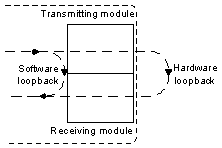
A- OTU Board Loopback: A loopback is used to determine whether the board is faulty. Types of loopback which we can apply them on The OTU boards to verify the board SDH services as the following
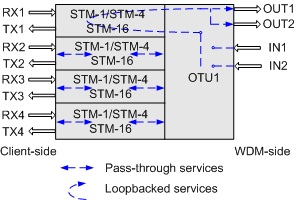
1- Client –Side Out-loop : this loop is used to detect whether the Fiber line and Connectors on the line are normal as the Following
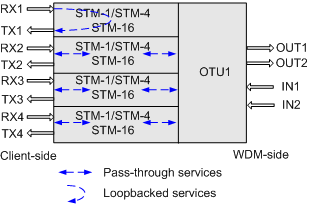
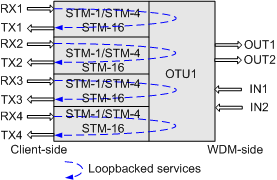
2- Client –Side In-loop : The loop is used to detect whether the received Signals are properly processed inside the board as the following
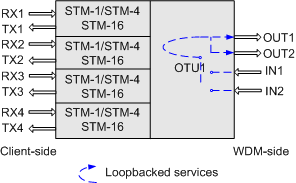
3- WDM –Side In-loop : this loop is used to detect whether the received Signals are properly processed inside the board as the following
4- WDM –Side out-loop : The loop is used to detect whether the Fiber line and Connectors on the line are normal as the following
B- OTN Tributary Board Loopback: An OTN tributary board we can do Inloop and Outloop to determine which Fault. The types of Loops as the following:
1- Out-loop on the OTN Tributary Board : this loop is used to Check whether optical Fibers and Connectors Functions properly as the following
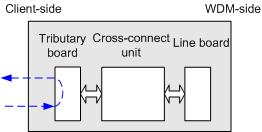
2- In-loop on the OTN Tributary Board : this loop is used to Check whether the board Properly processes received Signals as follows
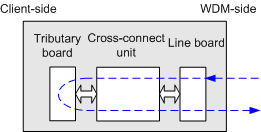
C-OTN Line Board Loopback: An OTN line board which include In-Loop and Out-loop
1- Out- loop on an OTN Line Board : this loop is used to Check Fibers line and Connectors Function are Working Properly as follows
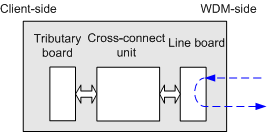
2- In-loop on an OTN Line Board : this loop is used to check whether the board properly processes received Signals
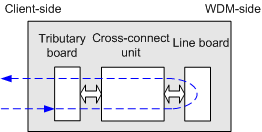
D-SDH Board Loopback: We have out-loops and In-Loops on Optical interface on SDH boards as the Following:
1- Out-loop on the SDH optical interface board: this loop is used to check whether the SDH interface and the external cable of the SDH board are normal and the loop does not change the signal structure within the optical interface board by the signal that is transmitted from the optical receiver module is directly looped from the SDH interface to the optical transmitter module.
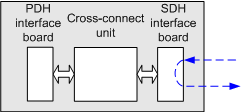
2- VC-4 out-loop on the SDH optical interface board: The loop checks whether the VC-4 channels at the SDH interfaces and on the fibers connected to the SDH board are normal and does not change the signal structure within the optical interface board where the VC-4 signal that is transmitted from the optical receiver module is directly looped from the VC-4 channel to the optical transmitter module
.
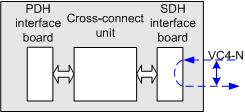
3- VC-3/VC-12 Out-loop on the SDH optical interface board: the loop checks The VC-3/VC-12 outloop does not change the signal structure within the optical interface board where the VC-3/VC-12 signal that is transmitted from the optical receiver module is directly looped from the VC-3/VC-12 channel to the optical transmitter module.
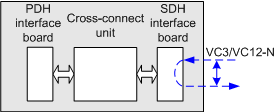
4- In-loop on the SDH optical interface board: The loop is used to check whether the SDH service processing module and the cross-connect board are normal a via The optical interface in-loop processes the signal at the local end within the optical interface board, where the signal that is transmitted from the cross-connect unit is looped from the SDH interface to the cross-connect unit
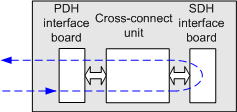
5- VC-4 in-loop on the SDH optical interface board: The loop checks whether the SDH service processing module and the cross-connect board are normal a via The VC-4 In-loop processes the signal at the local end within the optical interface board Where the VC-4 signal that is transmitted from the cross-connect unit is looped from the VC-4 channel to the cross-connect unit
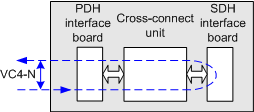
E-PDH Board Loopback: We can through PDH board apply in-loop and out-loop to test electric interface Board as the following
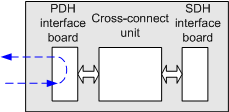
1- Out-loop on the PDH Electrical interface board: The loop checks whether the PDH interface and the external cable of the PDH board are normal and does not change the signal structure within the PDH electrical interface board where the signal that is transmitted from the receive port is directly looped back to the corresponding transmit port before being processed.
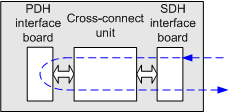
2- In-loop on the PDH Electrical interface board: The loop checks whether the PDH service processing module and the cross-connect board are normal by processing the signal at the local end within the PDH electrical interface board Where the signal that is transmitted from the cross-connect unit is looped back to the cross-connect unit
F-Ethernet Board Loopback: Through ETH Board we are Classified In-loop on ETH port into
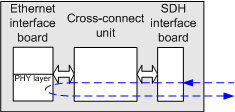
1- In-loop PHY Port Layer Loopback: the loop checks whether the MAC layer, SDH layer, and signals of the Ethernet board are normal where the Ethernet service that is transmitted from the NE is looped from the physical layer of the Ethernet port to the SDH layer
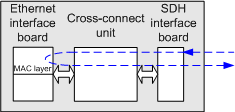
2- In-loop MAC Port Layer Loopback: this loop checks whether the SDH layer and signals of the Ethernet board are normal where the Ethernet service that is transmitted from the NE is looped from the MAC layer of the Ethernet port to the SDH layer
Finally, I hope that my technical post helps everyone to know how to make Loopback on mentioned Boards to test Optical interface, Electric interface, Connectors, Cables, Modules and Cross-Connection.