Showing posts with label Huawei OSN 3500. Show all posts

Friday, May 8, 2020

Which slot can install amplifier card on Huawei OSN3500?

Here I am  talking about which slot can install Huawei MSTP Amplifier board on OSN 3500 equipment.

The slots valid for the Huawei BA2 or BPA vary with the cross-connect capacity and subrack of Huawei MSTP Network equipment.
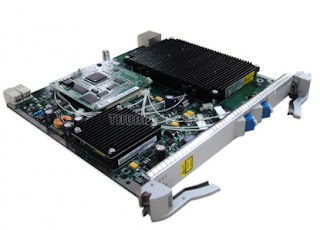
BPA

The slots valid for a board are determined by the following factors:

Slot bandwidth
Cross-connect capacity
Board version

Huawei SSN1BA2 card put slot : 

200Gbit/s cross-connection capacity: slots 1–8 and 11–17 in the subrack.

120Gbit/s cross-connection capacity: slots 1–8 and 11–17

80Gbit/s cross-connection capacity: slots 1–8 and 11–17

40Gbit/s cross-connection capacity: slots 1–8 and 11–16

Huawei SSN1BPA and SSN2BPA card put slot : 

200Gbit/s cross-connection capacity: slots 1–8 and 11–17

120Gbit/s cross-connection capacity: slots 1–8 and 11–17

Wednesday, September 19, 2018

Huawei AC/DC converter ETP4830-A1 Introduction


Huawei ETP4830-A1 is a box-type power system that supplies power for -48 V DC
communications equipment. It uses 15 A rectifiers and provides a maximum output current of 30 A; Apply for Huawei OLT, Huawei OSN 3500 OSN 6800&8800, Huawei Router and Huawei Switch and can be can be embedded in 19-inch rack or cabinet or other scenarios.

Model Number Description
  • Supports a wide voltage range of 85 V AC to 300 V AC.
  • Provides comprehensive battery management.
  • The SMU01A communicates with Huawei Network Ecosystem (NetEco) and third-party
  • element management systems (EMSs) over various security protocols, such as the
  • Simple Network Management Protocol (SNMP) and Hypertext Transfer Protocol Secure
  • (HTTPS), featuring flexible networking. It provides WebUI and implements remote
  • unattended management.
  • The SMU01B connects to the U2000 over Huawei master/slave protocols.
  • Displays information on a liquid crystal display (LCD) and provides buttons for
  • operations.
  • Supports electronic labels.
  • Rectifiers and the site monitoring unit (SMU) are hot-swappable.
  • Allows high-efficiency and standard-efficiency rectifiers with the same capacity to
  • coexist.
  • The rectifier power factor is 0.99.


Wednesday, July 4, 2018

How to Replace an EOS EGS4 on Huawei OSN 3500?

Prerequisites

  • You are an NM user with Operator Group rights or higher.
  • The type and position of the board to be replaced must be confirmed.
  • The old board and the new board have the same software version, and the new board does not contain any configurations.

Impact on System

The Ethernet boards Huawei EGS4 are classified into the transparent transmission boards and the switching boards. Replacing the boards of different types has the following impacts on services:
  • If you replace a transparent transmission board, the services on the board are interrupted.
  • When you replace a switching board, if the processing board is configured with the TPS/BPS/PPS/DLAG protection, the services on the processing board are protected.

Tools, Equipment, and Materials

Shielding bag, fiber extraction tool, and U2000

Procedure

  1. Select the spare part.
    • Select the spare board that has the same parameters as the board to be replaced.
    • If the board to be replaced supports the board version replacement function, check for substitute boards.
  2. Query and record the current alarms of the board.
  3. If the board to be replaced is connected by fibers, record the positions of fiber connections and remove the fibers by using a fiber extraction tool.
  4. Replace the board on the subrack of Huawei OSN 3500.
    When you remove or install the board, the BD_STATUS or COMMUN_FAIL alarm is reported. After the new board is online, the alarms are cleared automatically.
    The replacement considers the board that is configured with board-level protection as an example.

Thursday, June 21, 2018

What is Huawei SLQ16 board substitution relation among different versions?

SLQ16 is a 4 port STM-16 optical interface board, can be used on Huawei OSN 3500, OSN7500. SLQ16 comes with 4 unit SFP module.

When the AU-3 services and TCM function are not required, Huawei N1SLQ16 and N2SLQ16 can be substituted with each other. The N4SLQ16 supports the board version replacement function to substitute for the N1SLQ16/N2SLQ16.

Wednesday, May 9, 2018

What is the difference between Huawei N1SLD64 and N4SLD64?

There are many people asked board version difference when they need replace or add service board on Huawei device such as Huawei OSN 3500, OSN 8800.

Below is an comparison between Huawei STM-64 service boards version difference.

 N4SLD64  VS N1SLD64

1, N4SLD64 supports CWDM and DWDM colored optical interfaces, whereas the N1SLD64 does not.
2, N4SLD64 supports single-fiber bidirectional optical modules, whereas the N1SLD64 does not.
3,  N4SLD64 detects and reports voltage performance, whereas the N1SLD64 does not.
4, N4SLD64 supports the PRBS function, whereas the N1SLD64 does not.

Friday, May 4, 2018

What is the Working modes of Huawei EoS board EGS4?

What is the Working modes EGS4 on Huawei OSN 3500?


1, GE electrical port (N1EGS4): auto-negotiation, 1000M full-duplex.

2, GE electrical port (N4EGS4): auto-negotiation, 1000M full-duplex, 100M full-duplex, and 10M full-duplex.

3, GE optical port: auto-negotiation and 1000M full-duplex.

Note: Only on N1EGS4 and N4EGS4 boards support GE electrical port.