Showing posts with label OSN9800. Show all posts

Tuesday, January 30, 2024

Why we cannot query OSNR from NMS by OPM8 board?

This post is about the issue that Impossible to query OSNR from NMS by Huawei OPM8 board. Do have a look below for more information on the topic.


Issue Description

Networking Topology:


205523o2m5tj6vbojby4xv.png


Fault Symptom:

Failed to query OSNR by OPM8 board on site B.


205553chhmh0mmm277ox7o.png

Handling Process

1. In 100G system, the OSNR is calculated by EMCA module in the system control board. Even though, query the OSNR by OPM8 board, but it's not calculated by OPM8 direclty.

2. The EMCA module in the system control board performs modeling for each board and fiber type in an OMS trail. During calculation, the EMCA module obtains the input and output multiplexed-wavelength optical power of each OA on the OMS trail, and the single-wavelength signal and noise power scanned by the OPM8 board to calculate the single-wavelength OSNR.

3. So the OSNR calculation depends on the OMS OD route configuration. 

4. Check the "OD Route Configuration" of the OMS between site A and site B, the status is "Partially Created". Try to create once again by clicking "New", it reported "Not Supported Board Type (Error code: 38664)".


205627vtt7401xj7ua100p.png

5. Check all the boards on the OMS trail, in Site B, there are 15OAU, 52WSMD9, 55OPM8. Those boards can't be supported by Site A(OptiX OSN8800 UPS V100R012C10SPC300).

6. The Site B is new implemented, some new boards are not supported by Site A. So can't create the "OD Route Configuration". Finally, failed to calculate the OSNR.

Root Cause

The Site B is new implemented, some new boards are not supported by Site A. So can't create the "OD Route Configuration". Finally, failed to calculate the OSNR.


Solution

1. Upgrade Site A to R13C10SPC700 or later version, so Site A can support 15OAU, 52WSMD9, 55OPM8.

2. Create the 15OAU, 52WSMD9, 55OPM8 as logic board with the lower version, so Site A can support.


Suggestions

1. The OSNR of 100G system is calculated by EMCA module in the system control board, it depend on the OMS and "OD Route Configuration".

2. In the implementation phase, should consider the board can be supported, not only the current device, also should be supported by the peer device of OMS. 

Friday, August 18, 2023

Why we are unable to Add A VLAN in A VPLS Service on Huawei DWDM device?

 ISSUE DESCRIPTION


Adding a VLAN in an existing life service is so important that sometimes it becomes service-affecting, so special care should be taken while adding or deleting.


As we have a large transmission network based on the Huawei equipment OSN9800 and OSN1800 in all levels (CoreAggregation and Access the software version is V100R20), we usually experience changing the VLAN by adding and deleting it almost daily.


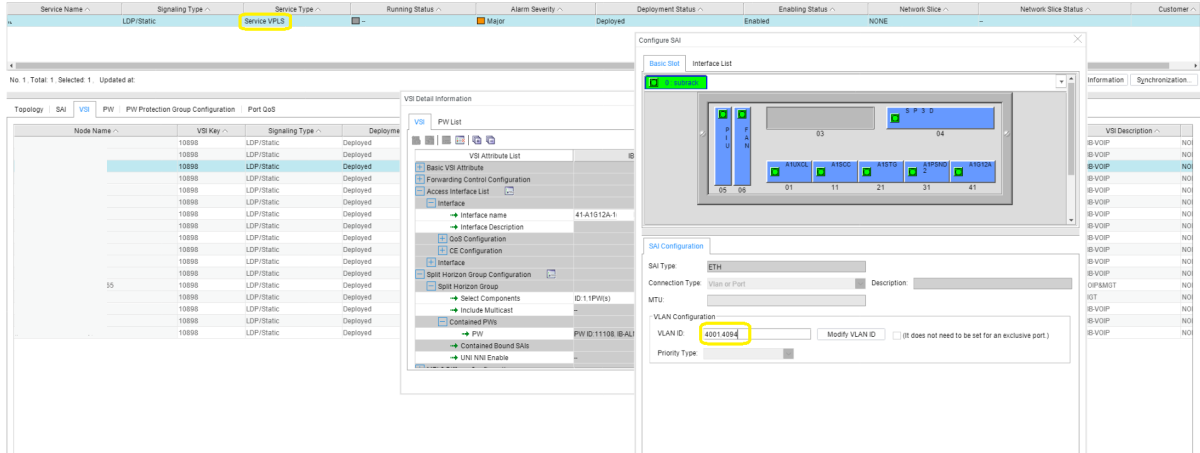
Usually, an easy way for adding a VLAN in VPLS is by going to NE Explorer > Configuration > E-LAN. Then, on the UNI page, you can add or delete; also, VLANs can be added to the VPLS service on the VSI page.


The message that popped up when trying to add VLAN 4094


Trying to add it another way

However, this time, while adding a VLAN to the VPLS service in an OSN1800I, the error message ((The VLAN ID has already been used)) popped up.


In fact, the VLAN wasn’t used in this VPLS, nor in any other service in the NE.


TROUBLESHOOTING PROCEDURE


I firstly uploaded the NE to make sure that the data in the NE was identical to the NCE data; however, the data was identical and the case persisted.


The VLAN number was special, as it was the last VLAN in the CVLANs (4094); but why couldn’t I use it? In the meantime, it is not used in any service in the NE.


Referring to the DCN Management page under NE Explorer > Communication, you can find under Bandwidth Management that the Ethernet boards use VLAN ID: 4094. That was the reason which caused the NE to consider the VLAN as a used VLAN:


SOLUTION


After we upgraded our network NEs to the software version V100R21, one of the features we had is the ability to use VLAN 4094 and to get rid of the limitation.