Thursday, April 27, 2023

How to configure the INTERNET WAN of Huawei ONT on the OLT?

Huawei GPON OLT supports the configuration of WAN ports for Huawei ONT through the CLI, including INTERNET WAN, VOIP WAN, IPTV WAN, and TR069 WAN.

Generally, one WAN port is configured with one type of service, and one WAN port may be configured with multiple types of services.


I would like to share with you how to configure the service type of Huawei ONT on the OLT as the WAN of the Internet type.


The configuration procedure is as follows:
Note that only the process is demonstrated here. Related parameters need to be configured based on your network.

1. Turn on the OMCI configuration switch

MA5800-X17(config)#gpon ont home-gateway config-method omci


2. Configure the WAN

a. Creating a WAN

Step 1, run the ont ipconfig command to determine the WAN port index and IP address obtaining mode.
Set the WAN port index to 3 and specify a static IP address (using PPPoE or DHCP).


MA5800-X17(config-if-gpon-0/4)#ont ipconfig 15 1 ip-index 3 static ip-address 11.x.x.20 mask 255.255.255.0 vlan 200 priority 5 gateway 11.x.x.11


Step 2: Set this parameter to the INTERNET.


MA5800-X17(config-if-gpon-0/4)#ont internet-config 15 1 ip-index 3


After the two steps are complete, the WAN configuration is generated on the ONT.


b. Bind the LAN port to the WAN port

Step 1, create a policy-based routing profile and bind LAN port 1 and SSID 1 to WAN port index 3.

 MA5800-X17(config)#ont policy-route-profile profile-id 0

MA5800-X17(config-policy-route-profile-0)#policy-route 0 port-based eth 1 wlan 1 wan 3


Step 2, the ONT is bound to the policy-based routing profile.


MA5800-X17(config-if-gpon-0/4)#ont policy-route-config 15 1 profile-id 0


Step 3, set LAN port 1 to Layer 3 mode. 

In this way, LAN port 1 can be successfully bound to the WAN port. Otherwise, the binding does not take effect.


MA5800-X17(config-if-gpon-0/4)#ont port route 15 1 eth 1 enable


Step 4, the LAN-WAN binding on the ONT is queried.


If no policy route profile is bound, The entry that does not exist is returned.
If a WAN port is created on the ONT web page, the WAN port can be queried after being created.


MA5800-X17(config-if-gpon-0/1)#display ont routing-table policy-route 15 1
-----------------------------------------------------------------------------
Policy route type : SourcePhyPort
Physical port name : LAN1,SSID1   //If not configured in step 3, LAN1 will not be displayed here
Vender class ID : -
Ether type : -
Wan name : OLT_C_1_INTERNET_R_VID_200
-----------------------------------------------------------------------------
Total: 1


c. Configure the WAN type and NAT switch


Step 1, Create a WAN profile, set the WAN port type to route, and enable NAT.


MA5800-X17(config)#ont wan-profile profile-id 0
MA5800-X17(config-wan-profile-0)#connection-type route
MA5800-X17(config-wan-profile-0)#nat enable


Step 2, the ONT is bound to the WAN profile.


MA5800-X17(config-if-gpon-0/4)#ont wan-config 15 1 ip-index 3 profile-id 0

3. Verify WAN Configuration

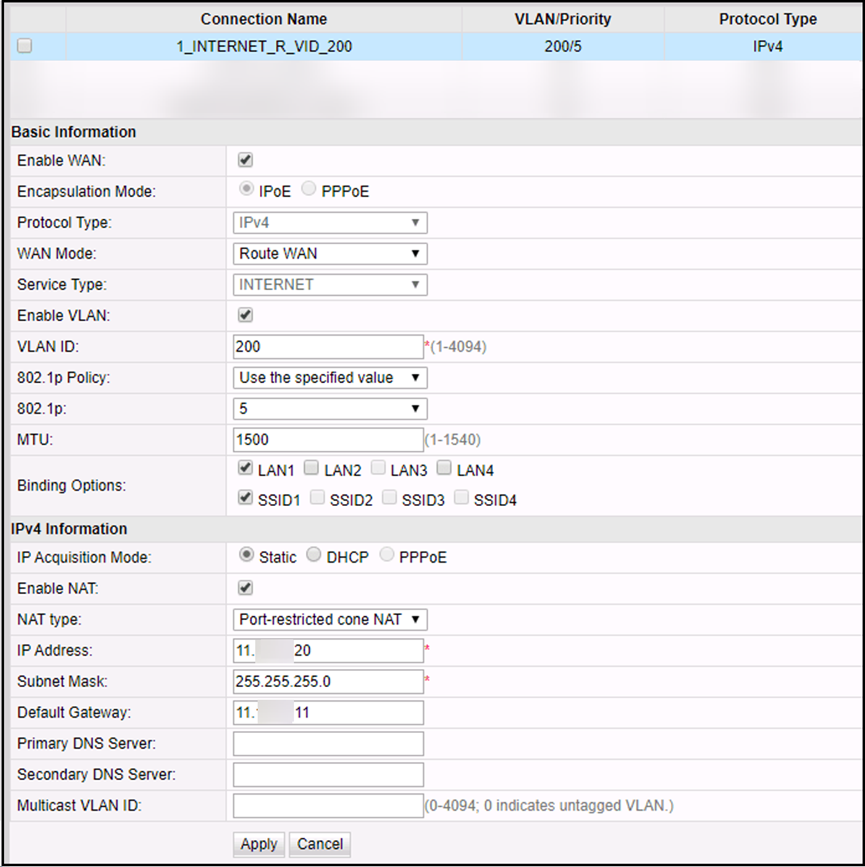
Log in to the ONT WebUI, you can view the created WAN configuration on the ONT WebUI, and check whether the configuration is consistent with that on the OLT.
 

141126jxyxbqljkmycfj0b.png

Thursday, April 20, 2023

What are the differences between WDM and OTN?

This post introduces the differences between DWDM and OTN. 

What is WDM?

WDM: Wavelength Division Multiplexing
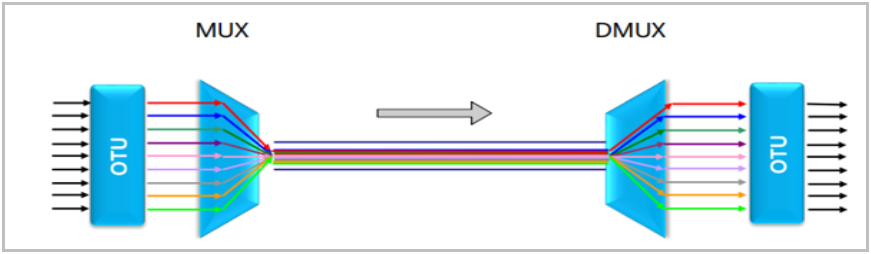
Strictly speaking, WDM refers to a technology that allows optical signals at multiple wavelengths to transmit over one optical fiber.
 

Typical WDM model:


WDM


Based on the number of wavelengths in use, the WDM system can be classified into dense wavelength division multiplexing(DWDM) and coarse wavelength division multiplexing(CWDM).

What is OTN?

OTN: Optical Transmission Network
Based on WDM, OTN integrates some advantages of SDH, such as abundant OAM overheads, flexible service grooming, and perfect protection modes.
OTN service grooming is classified into optical-layer grooming and electrical-layer grooming. 
Optical-layer grooming can be considered as WDM. And electrical-layer grooming can be understood as SDH.


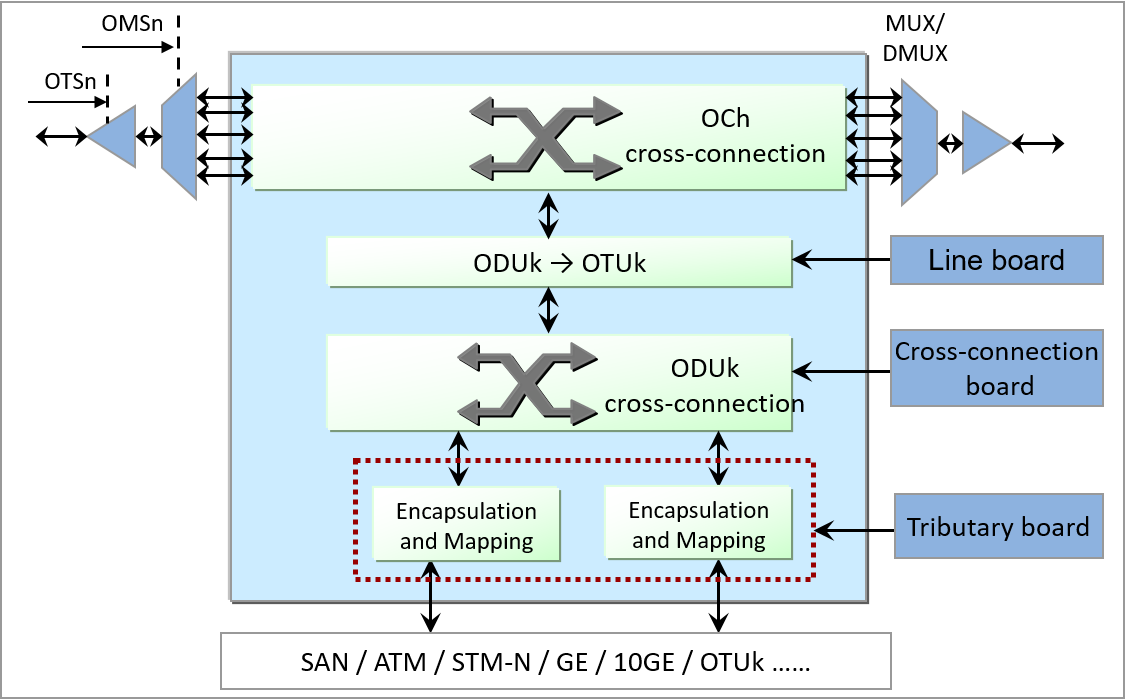
OTN site model:
 

OTN


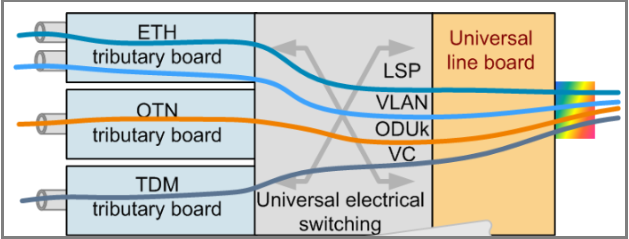
The electrical-layer hardware architecture of OTN equipment is the same as that of SDH equipment.: tributary board + cross-connect board + line board.


OTN


Differences between WDM and OTN

1. The WDM technology applies only to the optical layer and does not apply to the electrical layer. OTN includes both the optical layer and the electrical layer.


2. On a traditional WDM network, one wavelength can transmit only one service. One wavelength on an OTN network can transmit multiple services at the same time.


3. Traditional WDM sites have only OTU boards (wavelength conversion units). In OTN, the OTU board is divided into two parts: tributary board and line board, and electrical cross-connect boards are added. OTU boards can also be directly installed on OTN products.


4. The powerful overhead and monitoring capabilities supported by OTN improve network self-healing protection and reliability. The WDM technology can provide only optical-layer protection. The OTN technology can provide both optical-layer protection and electrical-layer protection.


5. OTN supports more types of services and higher board integration.


6. Through electrical-layer cross-connection grooming, OTN can flexibly schedule and allocate channel resources, improving bandwidth resource utilization.


7. The WDM technology has no corresponding frame structure, whereas the OTN technology has a complete frame structure.


8. OTN sites use a large number of electrical-layer boards. Therefore, network construction costs are high. A WDM site does not have a large number of electrical-layer boards. Therefore, the network construction cost is low.


9. The application scenarios are different. Traditional WDM is mainly applied to the access layer at the edge of the network as an OTM site. An OTN network can provide cross-connections for large-granularity services. The OTN network can be used at the aggregation layer and core layer as OADM sites. 


Related Huawei WDM and OTN devices OSN8800 T32 OSN9800 OSN1800 and so on.

Sunday, April 9, 2023

Why H901GPHF with configuration failed in MA5800?

Issue Description

[Problem Description]
H901GPHF with configuration failed in ma5800 device.

MA5800 V100R017C00SPH208


Handling Process

[Problem Analysis]


1.             Check the basic information: MA5800 H902MPLA V100R017C00SPH208.


2.              From the log, and we find the slot 2 H901GPHF configuration failed.


3.              From the last words, we find the MAP Message Block request failed record.


4.              Through the log and code troubleshooting analysis, there is MAP Message Block request failed issue that it have solved
             at higher version (for example: the version of R17C00SPH209 later).

Root Cause

[Root Cause] 

In probability case, the MAP Message Block request failed, which will affect high level protocol probabilistic send failed, resulting in configuration failure. 


Solution

[Solution Description]


1) The system switching can be recovered, but long runs may also have the problem of message sending exceptions;

2) Recommended upgrade to V100R017C00SPH210 patch version or later versions.

Thursday, March 9, 2023

Remote Shutdown Huawei OLT OTDR


Issue Description

The requirement is to Remote Shutdown OTDR, Huawei GPON OLT, for a site as its Temperature is >65 C now and further increasing . Since Quarentene has been applied for the city by government hence no body can access site to manually shut down the equipment. Thus we need whatever possible way to shutdown / lock / disbale / OSS the equipment from NOC. 


Product : U2000

Version: U2000 V200R017C60SPC2015

NE PRODUCT : MA5800-X17

VERSION : MA5800V100R019C10

PATCH   : SPC208


Solution

confirmed  , currently  device FTU and OLT doesn’t  support remotely shutdown .

But the OLT board can be power off or set to energy-saving  mode


For your reference :


board power-off frameid/slotid

board power-on frameid/slotid


huawei(config)#board power-off 0/3
  There are services running on the board ,     
  this operation will interrupt the services of the board,     
  are you sure to power off the board?(y/n)[n]y
  The board is being powered off, please wait.
  The board is powered off successfully


system energy-saving mode [ mode ]

undo system energy-saving mode


huawei(config)#system energy-saving mode                                                                                            
{ <cr>|mode<E><basic,deep,optimal,standard> }:basic                                                                                
                                                                                                                                    
  Command:                                                                                                                          
          system energy-saving mode basic                                                                                           
  Set the energy-saving mode successfully        


       OLT Temperature based on board ,different  board settings  may different .


       Confirmed with R&D ,FTU no such mechanism , it cannot shutdown based on temperature .

Thursday, February 16, 2023

What is Access Network?

You may not know what access networks are. However, when we talk about voice calls, web browsing, online games and videos, 4K, and multi-services (IPTV, video surveillance, and service access), you may know or have used these services. However, these services are brought by access networks.


Access Network


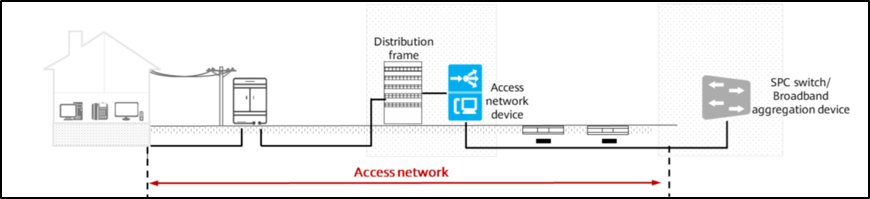
An access network (AN) is an implementation system that consists of a series of transmission entities (such as line facilities and transmission facilities)  between service node interfaces (SNI) and user network interfaces (UNI) and provides required bearer capabilities for providing telecommunications services. (defined by ITU-T)


Service node (SN) is a network element that provides access to various switched and/or non-switched telecommunications services.

Service node interface (SNI) is an interface for users to access the SN.

User network interfaces (UNI) refer to an interface between a terminal device and a network terminal that uses an access protocol.


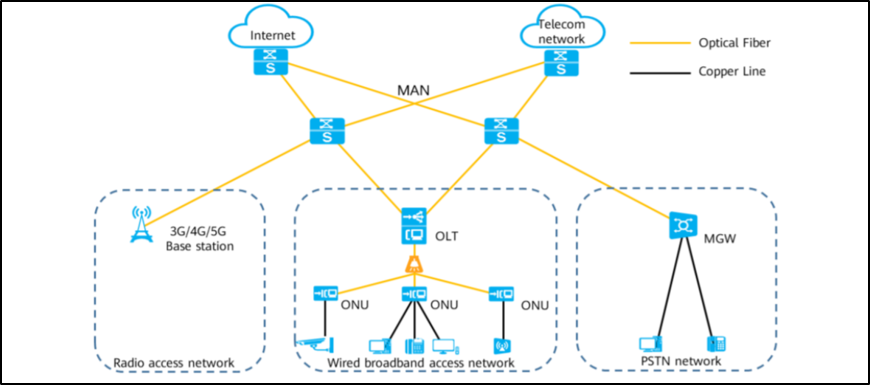
In the communications field, the access network is called the last mile. In fact, it is around us. Apart from common terminal devices (such as phones, mobile phones, and computers), it is the access network that is closest to us. This is determined by the position of the access network (directly facing users) in the entire telecom network.


The Access Network refers to all the machines and line devices between the local switch and the user terminal. The Access Network is directly connected to a large number of users and carious application systems and provides various services for users through various transmission media. 


Bandwidth is divided into narrowband access networks and broadband access networks.

Narrowband and broadband services are classified based on the amount of data that needs to be transmitted.


Generally, bandwidth larger than 2 Mbps belongs to broadband.

Narrowband services include voices and faxes. Broadband services include online surfing, VIDEOS, games, HDTV, and others.


Position of Access Network in the Telecom Network


Access Network


Evolution of Access Network technologies


The Access Network technology revolves around the following two problems:


1) Point-to-multipoint implementation


2) Higher bandwidth


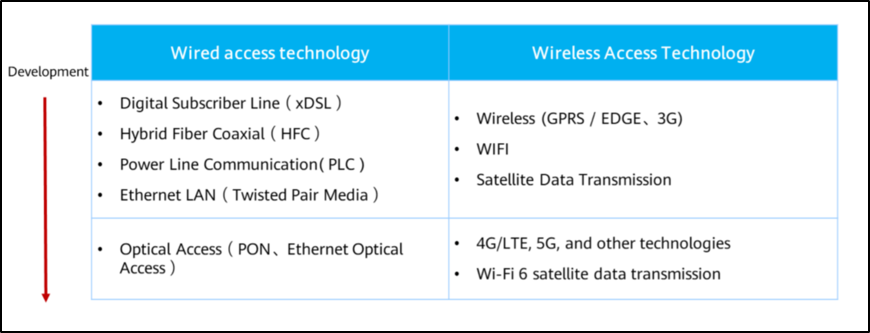
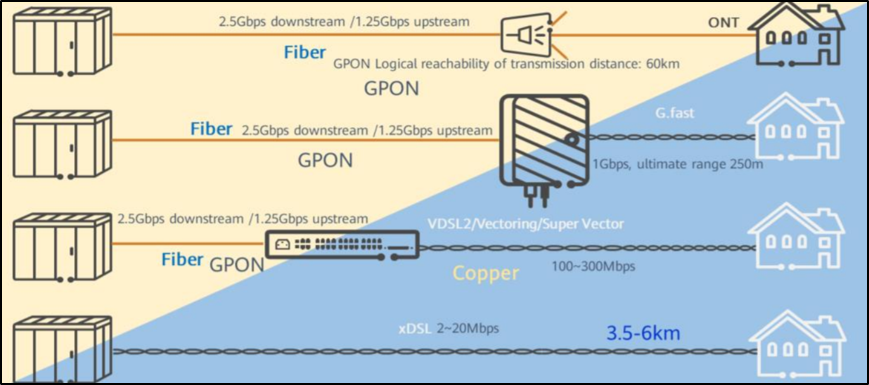
The following figure shows the main bandwidth access technologies.


Access Network


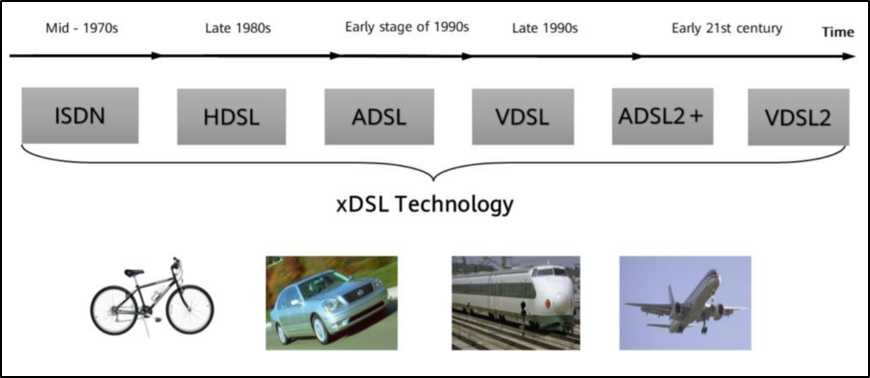
xDSL:


Access Network


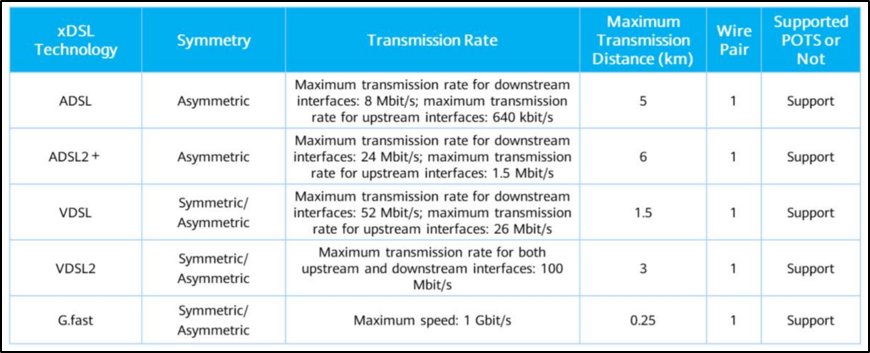
xDSL: x Digital Subscriber Line, a technology that uses high-frequency (higher than 4 KHz) signals on traditional telephone lines for modulation and demodulation to provide broadband Internet access services. Due to the higher spectrum than normal voice signals, the telephone line can still transmit voice when using xDSL to access the Internet. DSL is a technology developed by the telecommunications industry to use millions of kilometers of copper line circuits around the world. Therefore, it is also called copper line access technology.


Access Network


According to the preceding description, the xDSL bandwidth conflicts with the transmission distance. The higher the transmission rate, the shorter the transmission distance. To solve this problem, we introduce the "fiber-in copper-out" solution.


Optical access (AON and PON)


Access Network


Optical access technology solves the conflict between distance and bandwidth.


Optical access has the following features: 


  • Large bandwidth and good scalability. 

The optical fiber access bandwidth is large, meeting the flexible bandwidth requirements of users now and in the future. GPON provides high-bandwidth access in the upstream and downstream directions, with the upstream rate of 1.244 Gbit/s and the downstream rate of 2.488 Gbit/s.


  • P2MP (Point-to-multipoint) access, saving backbone optical fibers. 

The fibers at the CO are split and then led out from multiple home optical fibers, saving optical fiber resources.


  • Passive optical network (PON), low OPEX. 

No active components on the line, maintenance-free, and no electric power consumption.


  • Low fiber loss and wide coverage. 

Meet the requirements of "large capacity and few offices" network construction. Optical fibers are used for transmission. The coverage radius of the PON access layer can reach tens of kilometers.


The development of optical access can be divided into two phases:


AON is an active optical network that uses the point-to-point (PTP) network architecture. Each user has a dedicated optical line. An active optical network refers to a process in which switching devices such as routers and switching aggregators and active optical components are deployed between a central office device and a user distribution unit in a signal transmission process. These switching devices are driven by power to manage signal distribution and direction signals of a specific customer. Active optical components include light sources (lasers), optical receivers, optical transceiver modules, and optical amplifiers (fiber amplifiers and semiconductor optical amplifiers).


Access Network


PON is a point-to-multipoint network structure and is the main technology for implementing FTTB/FTTH. In a passive optical network (ODN), only optical fibers and passive components are used, and only energized devices are used at the signal source and receive end. In a typical PON system, the optical splitter is the core and is used to separate and collect optical signals transmitted over the network. The splitters used for the PON are bidirectional. In the downstream direction, the GPON OLT in the central office broadcasts IP data, voice, and video services to all ONUs on the PON through the 1: N passive optical splitter in the ODN. In the upstream direction, multiple types of service information from ONUs are coupled to the same optical fiber through the 1: N passive optical combiner in the ODN without interference, and finally sent to the receiving end of the OLT in the CO.


Access Network