Showing posts with label MA5800 X17. Show all posts

Friday, June 16, 2023

How to configure the VOIP WAN of Huawei ONT on the OLT?

Huawei OLT supports the configuration of WAN ports for Huawei ONT through the CLI, including INTERNET WAN, VOIP WAN, IPTV WAN, and TR069 WAN.

Generally, one WAN port is configured with one type of service, and one WAN port may be configured with multiple types of services.

I would like to share with you how to configure the service type of Huawei ONT on the 

OLT as the WAN of the VOIP type.

The configuration procedure is as follows:
Note that only the process is demonstrated here. Related parameters need to be configured based on your network.

1. Turn on the OMCI configuration switch

MA5800-X17(config)#gpon ont home-gateway config-method omci

2. Configure the WAN

a. Creating an ONT SIP Profile

MA5800-X17(config)#ont-sipagent-profile modify profile-id 1 proxy-server 10.x.x.1 proxy-server-port 5060 outbound-server 20.x.x.1 outbound-server-port 5060 registration server-uri reg.test.com expiration 3600

b. Creating a WAN

Step 1, run the ont ipconfig command to determine the WAN port index and IP address obtaining mode. Here, the WAN port index is set to 2. (The default value is 0 if the WAN port index is not specified.)

MA5800-X17(config-if-gpon-0/4)#ont ipconfig 15 1 ip-index 2 dhcp vlan 4000

Step 2, create a SIP interface and bind it to the created SIP profile.

MA5800-X17(config-if-gpon-0/4)#if-sip add 15 1 1 ip-index 2 sipagent-profile profile-id 1

Step 3, add a voice user. After the three steps are complete, the ONT creates a WAN port and issues voice-related parameter settings.

MA5800-X17(config-if-gpon-0/4)#sippstnuser add 15 1 1 telno 88880001 username u88880001 password p88880001 mgid 1

After the two steps are complete, the ONT creates a WAN port.

3. Verify WAN Configuration

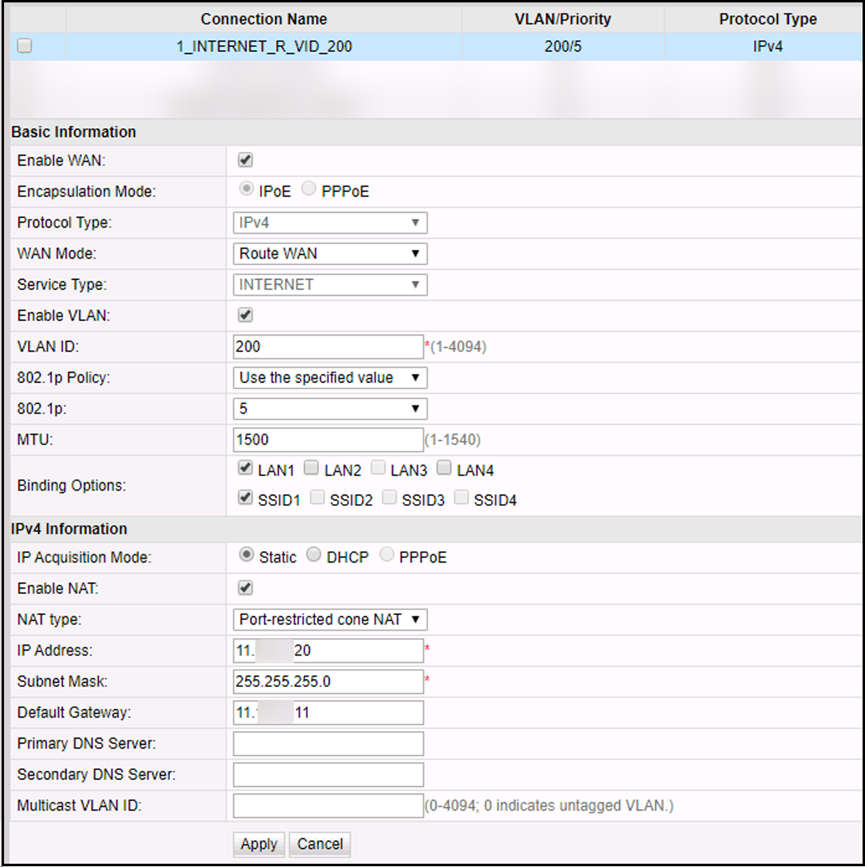
Log in to the ONT WebUI, you can view the created WAN configuration on the ONT WebUI, and check whether the configuration is consistent with that on the OLT.


4. Configuring Parameters of the Voice 

Create an ONT SIP Profile.


5. Query the ONT WAN port information on the OLT


Thursday, April 27, 2023

How to configure the INTERNET WAN of Huawei ONT on the OLT?

Huawei GPON OLT supports the configuration of WAN ports for Huawei ONT through the CLI, including INTERNET WAN, VOIP WAN, IPTV WAN, and TR069 WAN.

Generally, one WAN port is configured with one type of service, and one WAN port may be configured with multiple types of services.


I would like to share with you how to configure the service type of Huawei ONT on the OLT as the WAN of the Internet type.


The configuration procedure is as follows:
Note that only the process is demonstrated here. Related parameters need to be configured based on your network.

1. Turn on the OMCI configuration switch

MA5800-X17(config)#gpon ont home-gateway config-method omci


2. Configure the WAN

a. Creating a WAN

Step 1, run the ont ipconfig command to determine the WAN port index and IP address obtaining mode.
Set the WAN port index to 3 and specify a static IP address (using PPPoE or DHCP).


MA5800-X17(config-if-gpon-0/4)#ont ipconfig 15 1 ip-index 3 static ip-address 11.x.x.20 mask 255.255.255.0 vlan 200 priority 5 gateway 11.x.x.11


Step 2: Set this parameter to the INTERNET.


MA5800-X17(config-if-gpon-0/4)#ont internet-config 15 1 ip-index 3


After the two steps are complete, the WAN configuration is generated on the ONT.


b. Bind the LAN port to the WAN port

Step 1, create a policy-based routing profile and bind LAN port 1 and SSID 1 to WAN port index 3.

 MA5800-X17(config)#ont policy-route-profile profile-id 0

MA5800-X17(config-policy-route-profile-0)#policy-route 0 port-based eth 1 wlan 1 wan 3


Step 2, the ONT is bound to the policy-based routing profile.


MA5800-X17(config-if-gpon-0/4)#ont policy-route-config 15 1 profile-id 0


Step 3, set LAN port 1 to Layer 3 mode

In this way, LAN port 1 can be successfully bound to the WAN port. Otherwise, the binding does not take effect.


MA5800-X17(config-if-gpon-0/4)#ont port route 15 1 eth 1 enable


Step 4, the LAN-WAN binding on the ONT is queried.


If no policy route profile is bound, The entry that does not exist is returned.
If a WAN port is created on the ONT web page, the WAN port can be queried after being created.


MA5800-X17(config-if-gpon-0/1)#display ont routing-table policy-route 15 1
-----------------------------------------------------------------------------
Policy route type : SourcePhyPort
Physical port name : LAN1,SSID1   //If not configured in step 3, LAN1 will not be displayed here
Vender class ID : -
Ether type : -
Wan name : OLT_C_1_INTERNET_R_VID_200
-----------------------------------------------------------------------------
Total: 1


c. Configure the WAN type and NAT switch


Step 1, Create a WAN profile, set the WAN port type to route, and enable NAT.


MA5800-X17(config)#ont wan-profile profile-id 0
MA5800-X17(config-wan-profile-0)#connection-type route
MA5800-X17(config-wan-profile-0)#nat enable


Step 2, the ONT is bound to the WAN profile.


MA5800-X17(config-if-gpon-0/4)#ont wan-config 15 1 ip-index 3 profile-id 0

3. Verify WAN Configuration

Log in to the ONT WebUI, you can view the created WAN configuration on the ONT WebUI, and check whether the configuration is consistent with that on the OLT.


141126jxyxbqljkmycfj0b.png

Thursday, March 9, 2023

Remote Shutdown Huawei OLT OTDR


Issue Description

The requirement is to Remote Shutdown OTDR, Huawei GPON OLT, for a site as its Temperature is >65 C now and further increasing . Since Quarentene has been applied for the city by government hence no body can access site to manually shut down the equipment. Thus we need whatever possible way to shutdown / lock / disbale / OSS the equipment from NOC. 


Product : U2000

Version: U2000 V200R017C60SPC2015

NE PRODUCT : MA5800-X17

VERSION : MA5800V100R019C10

PATCH   : SPC208


Solution

confirmed  , currently  device FTU and OLT doesn’t  support remotely shutdown .

But the OLT board can be power off or set to energy-saving  mode


For your reference :


board power-off frameid/slotid

board power-on frameid/slotid


huawei(config)#board power-off 0/3
  There are services running on the board ,     
  this operation will interrupt the services of the board,     
  are you sure to power off the board?(y/n)[n]y
  The board is being powered off, please wait.
  The board is powered off successfully


system energy-saving mode [ mode ]

undo system energy-saving mode


huawei(config)#system energy-saving mode                                                                                            
{ <cr>|mode<E><basic,deep,optimal,standard> }:basic                                                                                
                                                                                                                                    
  Command:                                                                                                                          
          system energy-saving mode basic                                                                                           
  Set the energy-saving mode successfully        


       OLT Temperature based on board ,different  board settings  may different .


       Confirmed with R&D ,FTU no such mechanism , it cannot shutdown based on temperature .