Showing posts with label MA5800. Show all posts

Monday, May 15, 2023

Why Huawei OLT Cannot Be Added to NCE?

ISSUE DESCRIPTION 


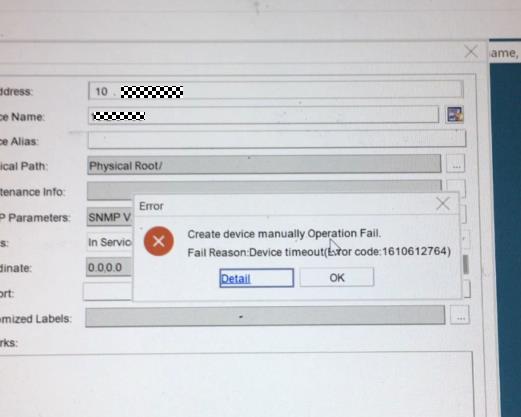
The new project deployed an Huawei OLT MA5800, but it cannot be added to NCE.


1


PROCESS


1. Ping test from the OLT to the NCE server and ping test from the NCE OS to the OLT to confirm that the network is reachable.


2. Check the SNMP configuration from the OLT and NCE, confirm whether the SNMP parameters configuration in the OLT and NCE are the same.


//check snmpv2c read and write community from OLT:


MA5800-X7#display snmp-agent community read
MA5800-X7#display snmp-agent community write


//check snmpv2c configuration of the NCE SNMP template:


Log in to the O&M plane, click Network Management Application, from the Main Menu > System > NE Communication Parameters > Default Access Protocol Parameters, find the template which adds the OLT to NCE and to use it click Modify SNMP Template to check the snmpv2c configuration, or to reconfigure the community parameters.


3. From the NCE OS, capture the packets when adding the OLT to NCE. Check to find out whether the OLT side does not reply to the SNMP packets. Suspect there is a firewall between the OLT and NCE.


4. Check the OLT firewall settings to confirm that the OLT does not enable the firewall. The customer confirmed that ther is no firewall between the OLT and NCE.


//OLT check firewall if enabled:


MA5800-X7(config)#display sysman firewall


5. Check the device product documentation. Find that the new version (R20 or later version) OLT increased more SNMP-related commands. Configure the system server source SNMP any-interface and from NCE add the OLT successfully.


ROOT CAUSE


The sysman server source configuration is missing.


SOLUTION


From the OLT configure the below command:


sysman server source snmp any-interface
sysman server source snmp ipv6


SUGGESTIONS


1. It is suggested to configure the SNMP source to any interface; configuring the SNMP source to the management vlanif can also work.


2. If using IPV6 to manage the OLT, please reference to the above command enable ipv6 source.


3. If SSH cannot log in to the OLT, enable the similar SSH source command as per below:


sysman server source ssh any-interface
sysman server source ssh ipv6

Sunday, April 9, 2023

Why H901GPHF with configuration failed in MA5800?

Issue Description

[Problem Description]
H901GPHF with configuration failed in ma5800 device.

MA5800 V100R017C00SPH208


Handling Process

[Problem Analysis]


1.             Check the basic information: MA5800 H902MPLA V100R017C00SPH208.


2.              From the log, and we find the slot 2 H901GPHF configuration failed.


3.              From the last words, we find the MAP Message Block request failed record.


4.              Through the log and code troubleshooting analysis, there is MAP Message Block request failed issue that it have solved
             at higher version (for example: the version of R17C00SPH209 later).

Root Cause

[Root Cause] 

In probability case, the MAP Message Block request failed, which will affect high level protocol probabilistic send failed, resulting in configuration failure. 


Solution

[Solution Description]


1) The system switching can be recovered, but long runs may also have the problem of message sending exceptions;

2) Recommended upgrade to V100R017C00SPH210 patch version or later versions.

Wednesday, December 7, 2022

ONU failure to go online – Problems with ODN

 This actical mainly about problems with ODN and how we can fix it. This is the last article about problems with ODN. In the previous post, I explained – connected connectors of different types and connected fibers of different types.


As I said in the first article about problems with ODN, there are the following problems:

  1. Feeder/distribution/drop fibers are broken,

  2. Dirty optical connectors,

  3. Bent fibers,

  4. Problem with optical splitters,

  5. Connected connectors of different types,

  6. Connected fibers of different types,

  7. Bad splices,

  8. Incorrectly designed networks or incorrectly realized networks.


Today I will explain bad splices and incorrectly designed networks or incorrectly realized networks.


7. Bad splices


There are three types of connection optical fibers: fusion splices, mechanical splices, and optical connectors. Now, I will shortly explain fusion and mechanical splices, bad splices, and the process for fix this problem.


We choose the way of connecting fibers based on: low attenuation, low reflection, and high reliability. In addition, application and price.


The most reliable and commonly used way of connecting fibers is fusion splice. This way of connecting the optical fibers enables low attenuation, low reflection, and high reliability. It is used mainly in the feeder and distribution segments, but also in the drop part of ODN. Generally, wherever on/off fiber is not required.


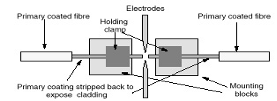
For fusion splicing, we use a special machine, is fusion splicer. In short, the fibers are prepared using certain tools (e.g. cable slitter, tube cutter, fiber striper, etc.), then cleaning with alcohol or some other liquid for fibers and wipes, then the optical fibers are cut using an optical cleaver. After that, the optical fibers are connected by a fusion connector. In the end, the fusion machine checks the splice: the strength of the joint and evaluates the attenuation.


Mechanical splices are very rarely used. The reason is potentially high attenuation, high reflection, and low reliability. Index matching gel becomes obsolete over time and parameters of the mechanical splice degrades. A mechanical splice is used when we do not have a sufficient number of fusion splicers, when we rarely splice and when there is an emergency intervention. Because that, they are used a little, I will not talk about them and the problems they can cause. That will be one of the new topics.


After short explaining how to connect fibers, I will now explain the most common problems with fusion splices.


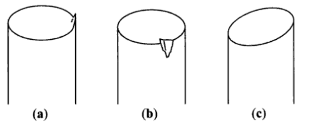
There are two main causes of bad splices. Dirty or insufficiently cleaned fibers will deviate during the process of splicing. Another problem is bad to cut fibers. The fiber must be cut at an angle of 90 degrees. This is very important to ensure a quality connection - a little attenuation and little reflection.


Sometimes fusion splicers can make a bad splice. Therefore, the electrodes and software settings should be checked.


Good splice has attenuation about 0.01 dB, max attenuation is 0.1dB. A bad splice may have a greater attenuation than the 0.1dB, values are from 1 to 5 dB. These values of attenuation can disable the connection between Huawei GPON ONT and GPON OLT such as MA5800 OLT. We can see the problem immediately after the splice is completed and repeat the splicing. After finished build the network, we must test all-optical lines by OTDR. With OTDR we can see all incorrect events on the route.


In the next two pictures, we can see the process of fusion splicing (figure 1.) and common cleave problems (figure 2.). In figure 2, there are three common cleave problems: lip, chip, and angle.

sl1


Figure 1. Process of fusion splicing

(https://imedea.uib-csic.es/~salvador/docencia/coms_optiques/addicional/ibm/ch06/06-04.html)

sl.2


Figure 2. Common cleave problems

(https://www.fiberoptics4sale.com/blogs/archive-posts/95049286-fiber-optic-cleaver)


8. Incorrectly designed networks or incorrectly realized network


Sometimes an error is made during design or building and an inadequate optical splitter is installed. In this way, we don`t have the optimal number of fiber divisions. Optical power may be higher or more often lower than required. For example, instead of splitting the fiber 32 times, it is split 16 or 64 times.


We can locate this problem with OTDR or using a PON meter. Incorrect optical power can disable connections between ONUs and OLT. The problem will be fixed when we change the inadequate optical splitter.

Thursday, November 25, 2021

XG (S) – PON | Motivation and Evolution

With the emergence of new applications and services that require more bandwidth, there is a need for the passive network to be able to support these services and deliver the necessary bandwidth. GPON passive networks have become a bottleneck for these services. Given the facts, we will have the rise of the next generation of GPON technology, XG(S)-PON (10G GPON).


Services


What’s XG (S) – PON?


XG (S) – PON is an enhanced next-generation PON technology that evolves from existing GPON technology standards. Some of the main features of this technology:


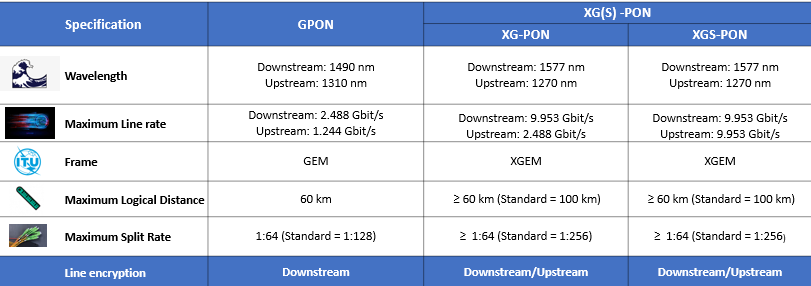
  • Higher bandwidth, capable of providing Internet access speeds of up to 10 Gbit/s. 4 times more than its predecessor GPON technology

  • Longest logical distance ≥ 60 km

  • Line Encryption on direction Downstream/Upstream

  • Split rate of up to 1:256


Differences between GPON, XG-PON and XGS-PON


difference


Evolution from GPON to XG(S)- PON


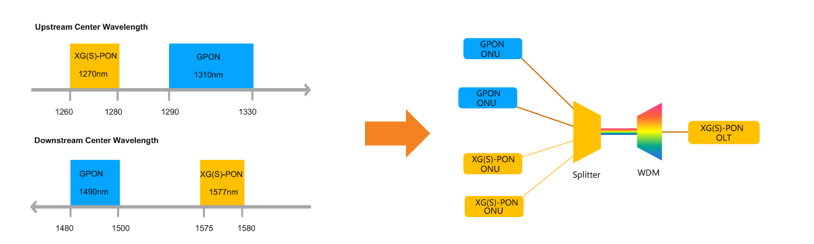
The wavelength of XG(S)-PON and GPON do not overlap. Therefore, they can share the same ODN network through Wavelength Division Multiplexing (WDM).


image


If the OLT does not support XG(S)-PON, you will need to add a new OLT that does. This is a disadvantage, as it will have additional cost when purchasing a new OLT, and you will have to discard the GPON OLT when your network is fully XG(S)-PON. A second disadvantage is the cost of purchasing a WDM1r multiplexer, and the space it will take up on your DC. Huawei has a great migration solution using XG(S) – PON Combo


What’s XG (S) – PON Combo?


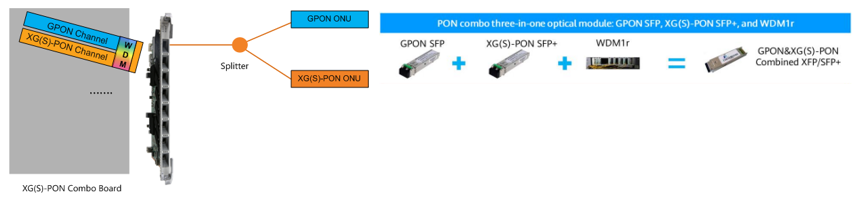
On the same PON port, we can have two passive technologies, being GPON + XGPON or GPON + XGS-PON. In addition, we have an optical module combo that integrates the GPON optical module, XG(S)-PON optical module, and WDM multiplexer to share ODN resources without adding an external WDM multiplexer.


optical


Evolution Process


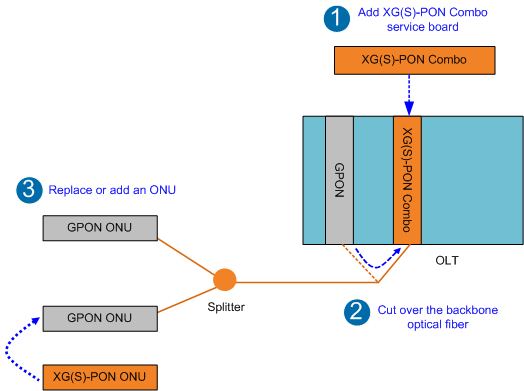
1. Add a board XG (S) – PON Combo

2. Migrate optical fiber from GPON port to XG port (S) – PON Combo

3. Add an ONU/ONT XG (S) – PON or change an existing ONU/ONT GPON


evo


Huawei Equipaments that support XG (S)


OLT

SmartAX MA5800 Series (X2, X7, X15, X17)

EA5801

Board

H902CSHD -  8-port XGS-PON and GPON Combo OLT interface board.

H902CSHF - 16-port XGS-PON and GPON Combo OLT interface board. It works together with the optical network unit (ONU) to provide XGS-PON and GPON access services.

H902CGHD - 8-port XG-PON and GPON Combo OLT interface board. It works together with the optical network unit (ONU) to provide XG-PON and GPON access services.

H901CGHF -16-port XG-PON and GPON Combo OLT interface board. It works together with the optical network unit (ONU) to provide XG-PON and GPON access services.


ONT

HN8546Q, XG-PON ONT, 4GE+1POTS+2USB+2.4G&5G

HN8145V, XG-PON ONT, 4*GE+1*POTS+1*USB+2.4G/5G WIFI

HN8346V, XG-PON ONT, 4GE+1POT+2USB+2.4G/5G Wi-Fi 

HN8546X6, XG-PON ONT, 4GE+2USB+1POT, 2.4G&5G Wi-Fi 6