Showing posts with label huawei osn3500. Show all posts

Tuesday, January 30, 2024

How to convert between common E1 services and E1 SNCP services?

This post will share how to convert between common E1 services and E1 SNCP services. 

Scenario Description

The network topology consists of four OptiX OSN 3500 and one virtual NE.
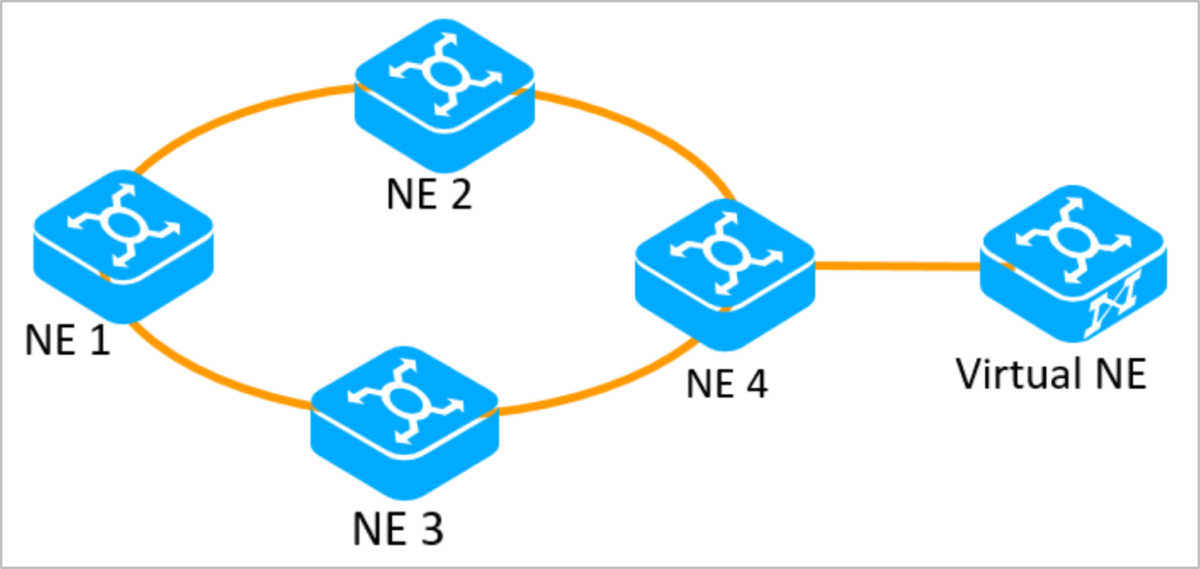
 

SDH


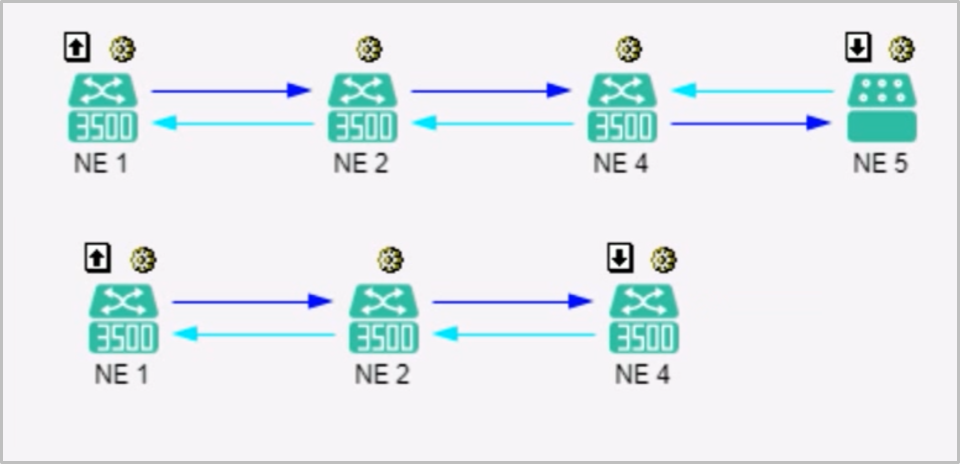
Carries two common E1 services.


SDH


Video

This video will show how to convert between common E1 services and E1 SNCP services, and how to implement conversion on virtual NEs after topology changes.


Text description


Converting common E1 services to E1 SNCP services

1. Confirm the existing E1 services.

2. Configure dual-fed and selective receiving on NE1.

A. Expanding bidirectional services into unidirectional services

B. Convert the unidirectional service whose signal source is a line board and whose signal sink is a tributary board to an SNCP service. The two services need to be configured separately.

C. Create the unidirectional service in the reverse direction by referring to the generated protection service. The two services can be configured at the same time.

3. Configure two bidirectional pass-throughs on NE3.

4. Configure the dual-fed and selective receiving service on NE4.

A. Expand bidirectional services as unidirectional services.

B. For the services forwarded to the virtual NE, convert the unidirectional services whose signal source is a dual-fed line board and whose signal sink is a selective-receiving line board into SNCP services. For the services dropped locally, select the unidirectional service whose signal source is a line board and the signal sink is a tributary board to convert the services to SNCP services.

C. Configure unidirectional services in the reverse direction according to the generated protection services.

5. Search for new SDH trails. 

Searching for new SDH trails = Refreshing SDH trails

Results:
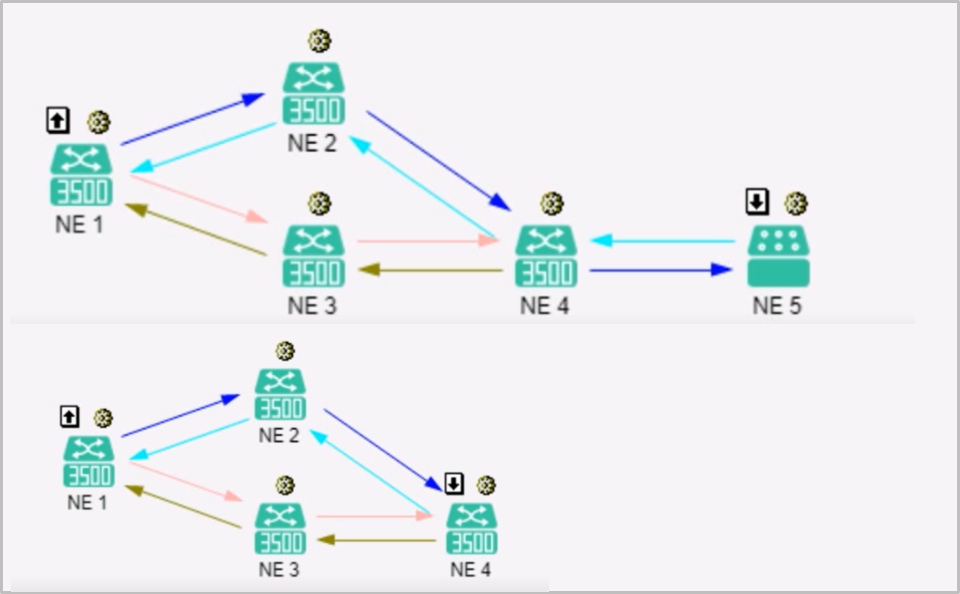
 

SDH


Please note:

1. On NE1 and NE4, the signal source is dual-transmit end and the signal sink is selective receive end, and the unidirectional service is converted into SNCP services. If the selection is incorrect, the conversion fails.

2. During the configuration, the timeslots occupied by the E1 services in each place must be correct. Otherwise, E1 SNCP trails cannot be searched out in the last step.


Converting E1 SNCP services to common E1 services

1. Operations on NE1

A. Expand a bidirectional path into a unidirectional path.

B. Restore the SNCP service to an unprotected service. When you select a unidirectional working service, the protection service is automatically selected.

Another simpler method is to select the protection service between, right-click, and choose Convert to Non-Protection Service from the shortcut menu. This does not require step A.
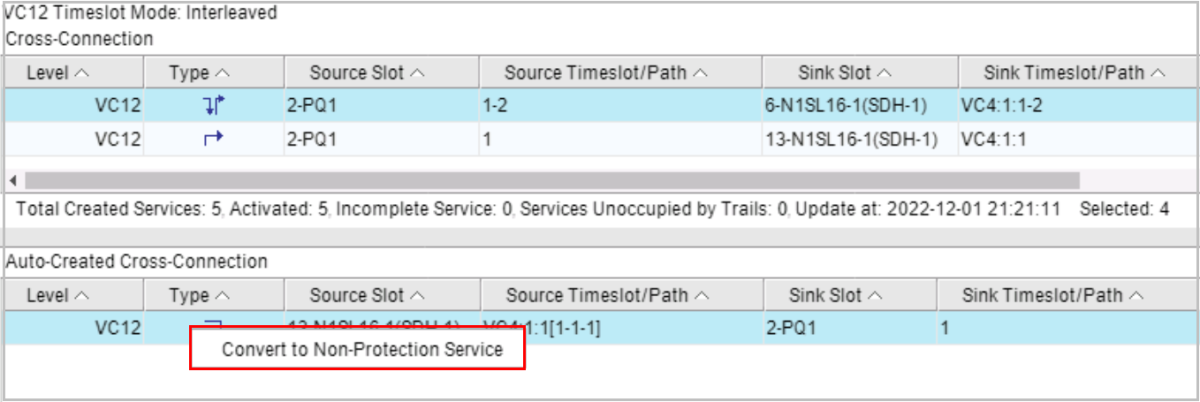
 

SDH


C. Delete unnecessary unidirectional services.


2. Delete the pass-through service from NE3.


3. On NE4, convert the SNCP service to the non-protection service. The operation method is the same as that of step 1.


4. Search for SDH trails again.


Service conversion on virtual NE

After NE6 is added to the topology, the virtual NE service can be used as the node of the SNCP service. Therefore, the first E1 service can be converted again. When two SNCP nodes are at both ends of an E1 path, the protection capability is the best.

1. Configure services on NE1, NE3, and NE6.

The configuration method is the same as above.


2. Configure SNCP services for virtual NEs.

Common E1 services cannot be converted to SNCP E1 services on virtual NEs.

Solution:

A. In the NE Explorer of the virtual NE, delete the original E1 service,

B. Create an SNCP service. The working timeslot must be the same as the deleted timeslot.

After the configuration is complete, the unidirectional service in the reverse direction is automatically created. It no needs to manually create the service again.


3. Search for SDH trails again.

Results:
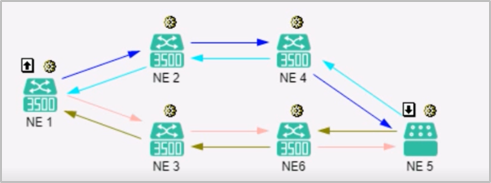
 

SDH


Please note:

1. When converting an E1 SNCP service to a common E1 service, it needs to delete the entire E1 SNCP service on the virtual NE and then create the common E1 service.

2. Creating, deleting, or modifying services on virtual NEs does not affect services.

Thursday, March 8, 2018

Huawei 90A Power Converter ETP4890-A2

ETP4890-A1-90A can convert from 220V or dual-wire of 110V into telecom grade -48V DC output. It has three rectifier slots, can support R4830G and R4815N, three R4830G rectifiers are configured by default. Monitor SMU01A, SMU01B, SMU01C are also supported, only SMU01A provides WebUI and implements remote unattended management.  ETP4890-A2-90A can apply to Huawei OSN8800 OSN3500 MA5800, which provides excellent performance such as intelligent battery management, remote monitoring, etc.


  • Supports a wide voltage range of 85 V AC to 300 V AC.
  • Provides comprehensive battery management.
  • Supports SMU01A, SMU01B, SMU01C Monitor module.
  • Supports WebUI remote management, only in SMU01A.
  • The SMU01B can connect to the U2000 over Huawei master/slave protocols.
  • Displays information on a LCD and provides buttons for operations.
  • Supports electronic labels.
  • Rectifiers and the site monitoring unit (SMU) are hot-swappable.
  • Allows high-efficiency and standard-efficiency rectifiers with the same capacity to coexist.
  • Apply for Huawei OLT, Huawei OSN, Huawei Router and Huawei Switch.

Tuesday, March 21, 2017

How to Locate fault during Huawei OptiX OSN2500?

Handling of Abnormalities of Fiber, Cable, and Connector

This section describes how to handle a fiber failure, cable failure, and a connector failure based
on the common causes of the fiber failure, cable failure, and connector failure.

Common Causes

  1. Cables are broken or wrongly spliced.
  2. Attenuation of cable and flange is very high.
  3. The cable connector is loose.
  4. Power cables are wrongly connected.
  5. The interface board is wrongly connected.

Procedure
    Step 1 On the U2000, check whether alarms, such as R_LOS, R_LOF, T_ALOS, P_LOS or
      IN_PWR_ABN, are triggered when the fiber, cable, or connector is abnormal. When these
        alarms exist, refer to Huawei OptiX OSN 2500 Intelligent Optical Transmission System Alarms
          Reference to handle these alarms.
            Step 2 Check whether optical fibers and power cables are broken.
              Step 3 Check whether optical fibers are wrongly spliced.
                Step 4 Check whether connectors are loose.
                  Step 5 Check whether the bending radius of the optical fiber is not less than 60 mm.

                  Checking Configuration Data

                  During the fault location and rectification, the configuration data should be checked.
                  Check whether the data is correctly configured. Especially, check the configuration data when
                  the services are interrupted during the equipment installation, commissioning and upgrade.
                  The query items include data configuration of the network, NE and U2000.

                  Checking Misoperation
                  Human misoperation may result in service interruption.

                  Misoperation
                  Human misoperation refers to the following operations on the available services.
                  Configure hardware or software loopback.
                  Configure services as unloaded.

                  Procedure
                  Step 1 Check whether the loopback is configured on the tributary or line. If the loopback is configured,
                  the LOOP_ALM alarm, indicating the loopback, can be queried on the U2000. In this case,
                  release the software or hardware loopback on the U2000 or equipment.
                  Step 2 Check whether "service unloaded" is configured on the U2000. If "service unloaded" is
                  configured, the alarm indicating that the path is unloaded, such as LP_UNEQ, can be queried
                  on the U2000. In this case, modify "service unloaded" to "service loaded".

                  Checking Consistency of Board Models
                  After the replacement, models of the new board and original board should be consistent.
                  Procedure
                  Step 1 Check whether the model of the replaced or added board during the upgrade or expansion is
                  consistent with that of the original board. Especially, in the case of the cross-connect and timing
                  boards with the active and standby relation, the active and standby boards should of the same
                  model. If the board models are inconsistent, the WRG_BD_TYPE alarm, indicating that the
                  board type of the inserted board is incorrect, can be queried on the U2000.
                  Step 2 According to the actual situation, check whether the setting of the DIP switch and jumper is correct.

                  Handling Hardware Faults of Equipment
                  If the fault is a hardware fault, replace the faulty board with a new one.
                  Common alarms indicating hardware faults are listed as follows:
                  HARD_BAD
                  COMMUN_FAIL
                  HSC_UNAVAIL
                  BD_STATUS
                  BUS_ERR
                  CHIP_FAIL
                  PLL_FAIL
                  TR_LOC
                  T_LOSEX
                  For handling of the preceding alarms, refer to the Alarms and Performance Events Reference.
                  Locate the faulty station by analyzing the alarms, indicators or using the loopback. Then, replace
                  the faulty board to rectify the fault.


                  Sunday, March 19, 2017

                  Huawei OSN2500 Configuration Data Analysis and Modification of Locating Faults

                  Huawei Optix OSN2500 Troubleshooting, Common Methods of Locating Faults: Configuration Data Analysis and Configuration Modification

                  Configuration Data Analysis
                  Analyzing the configuration data is a method used to determine and locate faults.
                  Overview
                  Sudden change in ambient conditions or improper operations may change or damage the
                  configuration data, for example, NE and board data of the equipment.
                  This can affect the service. In this case, after locating the fault at a single NE, further analyze
                  the configuration data to locate the fault.
                  Application
                  Locate the fault by querying and analyzing the current configuration data of the equipment.
                  The configuration data includes the following items:
                  Node parameters of the multiplex section
                  Path loopback setting for the line and tributary boards
                  Tributary path protection attributes
                  Path trace byte
                  For example, if the SNCP protection of a certain tributary board does not work, query whether
                  the path attribute of the tributary board is set to "protection".
                  You can view the operation log on the NM to check whether any improper operation on the NM
                  is performed.
                  Summary
                  This method is applicable to further analysis of a known faulty NE and helps to find the root
                  cause of a fault. This method, however, takes a long time and requires expertise in the field of
                  optical transmission and essential product knowledge.
                  Configuration Modification
                  Configuration modification is a method used to determine and locate faults.
                  Overview
                  Use this method to modify the timeslot configuration, slot configuration, and board parameter
                  configuration. This method also removes problems caused by configuration errors in a known
                  faulty NE.
                  In addition, this method is used to troubleshoot pointer justifications.
                  Application
                  If some path of a tributary board or some tributary board is suspected to be faulty, modify the
                  timeslot configuration to shift the payload to other path or tributary board.
                  If a certain slot is suspected to be faulty, change the slot configuration.
                  If a VC-4 is suspected to be faulty, shift the traffic to another VC-4.
                  During the upgrade or expansion, if you are unsure about the new configuration, you can re-load
                  the original configuration for confirmation.
                  Modifying the timeslot configuration, however, does not help to locate the faulty point or faulty
                  board, for example, a line board, tributary board, cross-connect board or backplane.
                  In this case, use the replacement method or the loopback method to further locate the fault. This
                  method is applicable in the preliminary process of locating faults when spare boards are not
                  available. Other service channels or slots are used to resume the service temporarily.
                  To modify the configuration in case of pointer justification, modify the tracing direction and the
                  reference source of the clock.
                  Summary
                  This method is used to resume the service temporarily when no spare board is available for the
                  replacement, or is used in handling the problem of pointer justification. The maintenance
                  personnel may not find this method convenient.
                  In addition, save the original configuration before you use this method. Record the steps used
                  to locate the fault.

                  More related products:

                  Huawei OptiX OSN3500


                  Wednesday, March 15, 2017

                  Guiding you how to upgrade Huawei OptiX NG-SDH Hot Patch

                  Checking Board Information

                  When engineers need upgrade Hot Patch of Huawei OptiX NG-SDH, such as Huawei OSN3500, Huawei OSN1500, they must check all boards information.


                  Description
                  Check whether all board versions match each other and determine whether to upgrade the NE according to the board types and release documents.
                  Precautions
                  Ensure that you have obtained the version mapping table and patch notes.
                  Procedure
                                                 Step 1     Choose Administration > NE Software Management > NE Data Backup/Restoration on the main menu.
                  The Transport/PTN NE View tab page is displayed.
                                                 Step 2     Click to display the Board Information tab page and then click Query.
                  Information about all boards will be displayed.

                                                 Step 3     Check the board versions against the version mapping table. If any version discrepancy occurs, upgrade or downgrade the board to the mapping version.                          
                       Step              4    Query the board manufacturing information on the NMS or by running the :cfg-get-bddetailinfo:bid command. BD-Name indicates the board type.
                                                 Step 5    Check whether a board needs to be upgraded according to the version mapping table and patch notes.
                  If an NE supports board-level hot patch upgrades, the query result helps determine which boards require board-level hot patches before an upgrade and check whether a board-level hot patch takes effect after an upgrade.
                  Follow-up Procedure
                  Upgrade the board whose version is different from that specified in the version mapping table.

                  Checking Whether Any Boards Are Offline or in BIOS State

                  Perform this task to check whether any boards are offline or in BIOS state. If any board, especially the standby HUAWEI SCC board, is offline or in BIOS state, a hot patch upgrade for the NE will fail.

                  Checking Whether Sufficient Space Is Available on Boards Perform

                  mapping tablecheck whether sufficient space is available on boards. If the boards do not have sufficient space, the upgrade will fail.