Huawei OSN 8800 100G tributary board is TSC, it has two functional version TN54 and TN55. TN55TSC can be created as TQX on the NMS and it can replace TN54TSC without any software upgrade. After substitution, the TN55TSC functions
as the TN54TSC.
Below are Mapping between TSC board and OSN 8800 equipment:
Expect for equipment mapping, OSN 8800 T64 T32 T16 have their coresponding cross-connect boards, then how about TSC, does it also have coresponding cross-connect board? Answer is YES.
For an enhanced OptiX OSN 8800 T64 subrack, the TSC board must work with TNK2USXH+TNK2UXCT boards.
For an enhanced OptiX OSN 8800 T32 subrack, the TSC board must work with the TN52UXCH or TN52UXCM board.
For an OptiX OSN 8800 T16 subrack, the TSC board must work with the TN16UXCM board.
Thunder-link.com supplies full series OSN8800 OSN6800 boards with test report and technical supports, if you have any problem, you can contact us.
.
Daisy, sales manager at Thunder-link.com, a leading Huawei hardware supplier. Focus on Huawei MSTP, WDM, OLT, ONT, SWITCH, with competitive price and free remote technical support.
Wednesday, March 11, 2020
Wednesday, March 4, 2020
How to deal with Abnormal Switching of SNCP service on ONT line board NS4 of Huawei OSN8800?
This is a case about handling abnormal switching of SNCP service on ONT line board NS4 of Huawei OSN8800.
100G line board TN54NS4 of a customer is configured with SNCP services. It is reported that multiple abnormal switching occurs on the live network, no fiber cut occurs on the optical cable, and the optical power is normal. Therefore, the root cause analysis needs to be performed.
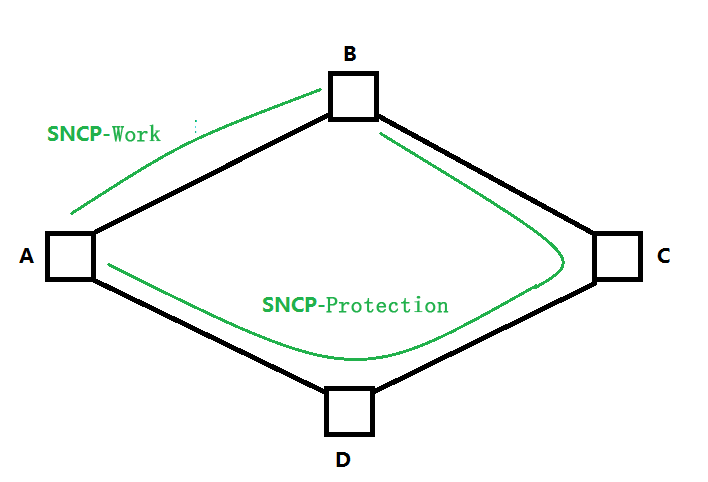
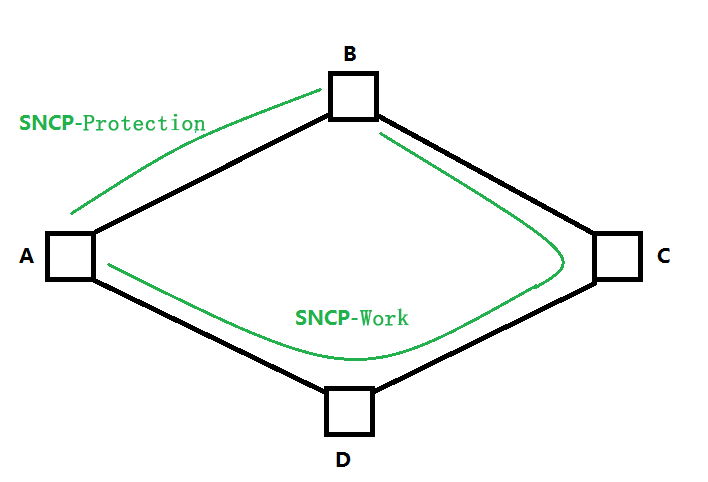
The networking is as follows:

Alarm information:
ODU_SNCP_PS
Handling Procedure
1. Query the NMS alarms. It is found that the ODU_SNCP_PS alarm occurs multiple times and the SNCP switching occurs.
2. Check the current and historical alarms of the device. It is found that no fiber cut alarm is generated.
3. Continue to check the receive optical power of TN54NS4. It is found that the receive optical power is stable. Therefore, the switching is not caused by the bit errors caused by the power jitter.
4. According to the networking analysis (as shown in the following figure), it is found that SNCP switching occurs at a certain time, and services are switched from SNCP-to SNCP-protection. The switching cause may be caused by bit errors on the line. Because there is only one span between A-B, it can be confirmed that the problem is caused by this span.

5. The customer performed an OTDR test on the optical cable between the site A and the site B. It was found that the problem was caused by the reflection point of the optical cable.
6. The reflection point has a hop contact. After the connector is cleaned, the OTDR test shows that the reflection is normal and the SNCP switching is normal.
Root Cause
The fiber jumper connector is faulty. As a result, bit errors occur due to reflection and SNCP switching is triggered.
Suggestions and Summary
1. Alarm, performance, and optical power are the basic methods for locating WDM problems.
2. Common factors related to bit errors on the line side: a, non-linear effect; b, there is an abnormal reflection point on the line side
If you encounter same issue about NS4, you can refer to this article, it would be helpful.
Thursday, February 13, 2020
A case of flash fault handling on the Huawei OSN6800 SCC board
How to handle flash fault on Huawei OSN6800 SCC board?
Problem Description:
The SCC board of the OSN6800 reports NESTATE_Install alarm
The user cannot remove or replace the faulty board, because both SCC boards in subrack 0 report the ESTATE_Install and DBMS_ERROR alarm.
No hexadecimal alarm code is displayed in the alarm description box on the U2000.
SOFTWARE VERSION:V1R5C00SPC800
Troubleshooting process:
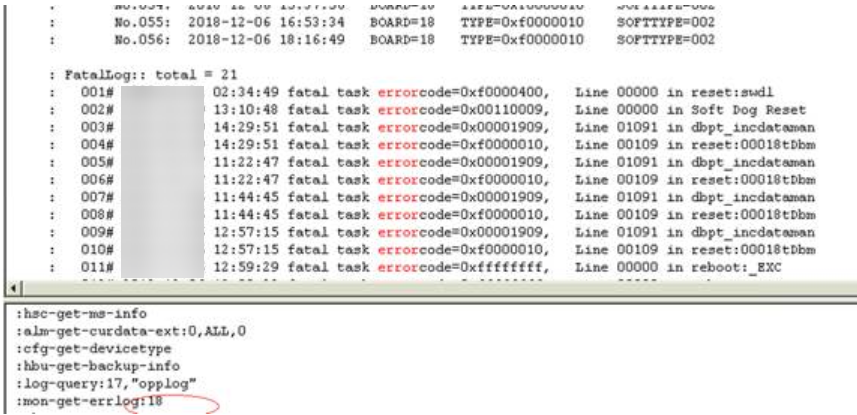
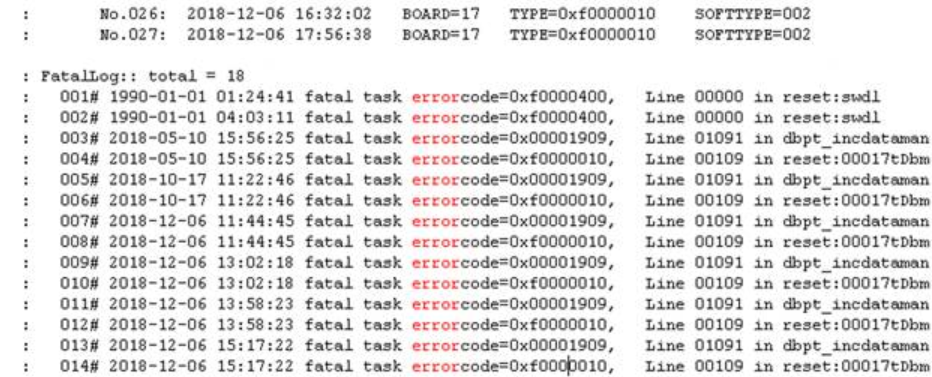
1. We check the flash memory of the TN11SCC01 boards and find them all problematic.
SLOT 18 FLASH issue:

SLOT 17 FLASH issue:

Therefore, the user needs to apply for two new SCC boards.
Replacement Process:
1. Clear the new SCC boards database :
1) Modify spare card bios switch from 0000 to 1011
2) Install that equipment and wait for 10 mins (clear database)
3) Remove out from the device and modify bios switch from 1011 to default “0000”
2. Due to the new controller card software version is unknown, the new card needs to copy software from the existing SCC.
1) Current working board is slot 17 (hsc-get-ms-info master : 17 ),
Current node software version is v1r5c00spc800 (sftm-query-pkgver )
Remove the faulty card from slot 18 /put the new card.
wait for software version auto-update and verify slot 18 new card software modified or not
:sftm-get-testver:17 (make sure 17/18 same software version)
2) After the new card updates software version successsfully : v1r5c00spc800, query current configuration.
:cm-get-neid:
:cm-get-ip:
:cm-get-gateway:
:cm-get-submask:
Remove the faulty card:slot 17 (only one spare card installs on slot 18), now node lost connection(Services are not interrupted)
Need to modify node id / ip address / gateway /submask by local.
:cm-set-neid:
:cm-set-ip:
:cm-set-gateway:
:cm-set-submask:
The node should be connected again with NMS after the operation is complete.
3. Request windows time to restore database from data backup files
Select “with service interruption/ reboot (different NMS version issue. ) ”and “not deliver to board active ".

4. We need to manually create a database if the old one mismatches with the current traffic.
What are the GPON and Ethernet port parameters of Huawei ONT EG8141A5?
EG8141A5 is Huawei new model GPON ONT, ports are almost same as old model HG8546M, with 1POTS + 1GE + 3FE + 2.4G Wi-Fi, but difference is that 5db and 3db antenna. Below is the introduction of EG8141A5 GPON and Ethernet port parameters
GPON Port
• Class B+
• Receiver sensitivity: -27 dBm
• Overload optical power: -8 dBm
• Wavelengths: US 1310 nm, DS 1490 nm
• Wavelength blocking filter (WBF) of G.984.5
• Flexible mapping between GEM Port and TCONT
• GPON: consistent with the SN or password
authentication defined in G.984.3
• Bi-directional FEC
• SR-DBA and NSR-DBA
• Type B (single-homing & dual-homing)
Ethernet Port
• Ethernet port-based VLAN tags and tag removal
• 1:1 VLAN, N:1 VLAN, or VLAN transparent
transmission
• QinQ VLAN
• Limit on the number of learned MAC addresses
• MAC address learning
• GE: Auto-adaptive 10 Mbit/s, 100 Mbit/s or 1000
Mbit/s
• FE: Auto-adaptive 10 Mbit/s, 100 Mbit/s
GPON ONT is end-consumption, new models will replace old models. Thunder-link.com provides various Huawei ONT, both new and old models, RF or dual-band models, for more details, you can view the website.
GPON Port
• Class B+
• Receiver sensitivity: -27 dBm
• Overload optical power: -8 dBm
• Wavelengths: US 1310 nm, DS 1490 nm
• Wavelength blocking filter (WBF) of G.984.5
• Flexible mapping between GEM Port and TCONT
• GPON: consistent with the SN or password
authentication defined in G.984.3
• Bi-directional FEC
• SR-DBA and NSR-DBA
• Type B (single-homing & dual-homing)
Ethernet Port
• Ethernet port-based VLAN tags and tag removal
• 1:1 VLAN, N:1 VLAN, or VLAN transparent
transmission
• QinQ VLAN
• Limit on the number of learned MAC addresses
• MAC address learning
• GE: Auto-adaptive 10 Mbit/s, 100 Mbit/s or 1000
Mbit/s
• FE: Auto-adaptive 10 Mbit/s, 100 Mbit/s
GPON ONT is end-consumption, new models will replace old models. Thunder-link.com provides various Huawei ONT, both new and old models, RF or dual-band models, for more details, you can view the website.
Thursday, January 16, 2020
Can I use Huawei ONU MA5626 as a switch?
Can I use GPON ONU MA5626 as a switch?
Huawei MA5626 is not recommended as a switch.
During routine operation and maintenance, you can configure the MA5626 as a switch through command lines if needed.
1. Log in to the MA5626. The default user name and password are root and mduadmin respectively.
2. Enter config mode.
cmd:
MA5626>enable
MA5626#config
MA5626(config)#
3. cmd:
vlan service-profile profile-id 1 profile-name "srvprof-1"//Configure a VLAN service profile.
user-bridging enable //Enable the user bridging mode.
commit //Confirm and execute the command.
4. cmd:
vlan bind service-profile 100 profile-id 1 //Bind the VLAN to be configured for a port to the VLAN service profile.
5. cmd:
service-port vlan 100 eth 0/1/1 multi-service user-vlan untagged rx-cttr 6 tx-cttr 6 //After configuring port data, configure the MA5626 as a switch.
Wednesday, January 8, 2020
Are Huawei MA5680T MA5683T MA5608T outdoor or indoor cabinets the same?
Regarding Huawei MA5600T series OLT, there are three type MA5680T
MA5683T and MA5608T, with different size, GPON slots, and the cabinet models
are not the same.
MA5600T (ETSI)
Indoor
cabinet: N63E-22, N66E-18
Outdoor
cabinet: F01D500, F01D2000
MA5600T
(IEC)
Indoor
cabinet: N66E-22
Outdoor
cabinet: none
MA5683T
Indoor
cabinet: N66E-18
Outdoor
cabinet: F01D500, F01S300
MA5608T
Indoor
cabinet: N63E-22
Outdoor
cabinet: F01S200
Wednesday, January 1, 2020
How to expand Value-Added card VSUF-160 forwarding capability?
VSUF-160 ME0DVSUFD070 is a flexible value-added service processing card on Huawei BRAS ME60, it can provide a forwarding capability of 400 Gbit/s. If forwarding capability expansion required, there are two ways:
1, 20G license
A 20G license expands the forwarding capability of a VSUF-160 by 20 Gbit/s. A VSUF-160 supports a maximum of two 20G licenses.
2, SP160
An SP160 ME0D00SPD070 provides a forwarding capability of 40 Gbit/s. A VSUF-160 supports a maximum of two SP160s.
To enable a VSUF-160 to provide a forwarding capability of 160 Gbit/s, install two 20G licenses and two SP160s on the VSUF-160.
Note: ME60-X8, installing the VSUF-160s in slots 3, 4, 5, and 6 is recommended. On the ME60-X16, installing the VSUF-160s in slots 3, 4, 5, 10, 11, 12, 13, and 14 is recommended.
In 70 A PEM scenarios, the fourth partition of an ME60-X16 chassis supports five LPU/VSU slots but can support only a maximum of four VSUF-160s/VSUF-160-Es. That is, an ME60-X16 chassis supports a maximum of 15 VSUF-160s/VSUF-160-Es. An ME60-X8 chassis can be fully configured.
The VSUF-160 is supported only on the ME60-X8 and ME60-X16 and must work with the 200G SFU.
Subscribe to:
Posts (Atom)