Friday, May 8, 2020

Which slot can install amplifier card on Huawei OSN3500?

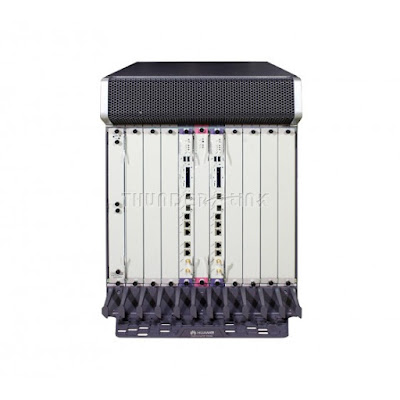
Here I am  talking about which slot can install Huawei MSTP Amplifier board on OSN 3500 equipment.

The slots valid for the Huawei BA2 or BPA vary with the cross-connect capacity and subrack of Huawei MSTP Network equipment.

BPA

The slots valid for a board are determined by the following factors:

Slot bandwidth
Cross-connect capacity
Board version

Huawei SSN1BA2 card put slot : 

200Gbit/s cross-connection capacity: slots 1–8 and 11–17 in the subrack.

120Gbit/s cross-connection capacity: slots 1–8 and 11–17

80Gbit/s cross-connection capacity: slots 1–8 and 11–17

40Gbit/s cross-connection capacity: slots 1–8 and 11–16

Huawei SSN1BPA and SSN2BPA card put slot : 

200Gbit/s cross-connection capacity: slots 1–8 and 11–17

120Gbit/s cross-connection capacity: slots 1–8 and 11–17

Monday, April 27, 2020

How to Configure 10G LAN & 10G WAN in Huawei DWDM network?

What are the differences between 10GE LAN and 10GE WAN services?

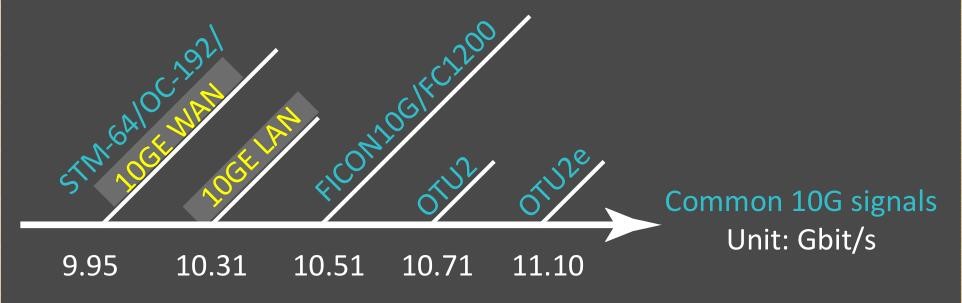
According to IEEE 802.3ae, compared with 10GE LAN services,10GE WAN services involve an additional process in which signals are encapsulated into standard SDH/SONET frames. In other words, 10GE WAN services are processed in a similar way as how Huawei STM-64 service board are processed in a Huawei WDM/OTN system.The most direct difference between 10GE LAN and 10GE WAN services is that they have different signal rates.


10G service rates


How do we configure 10GE LAN and 10GE WAN services?

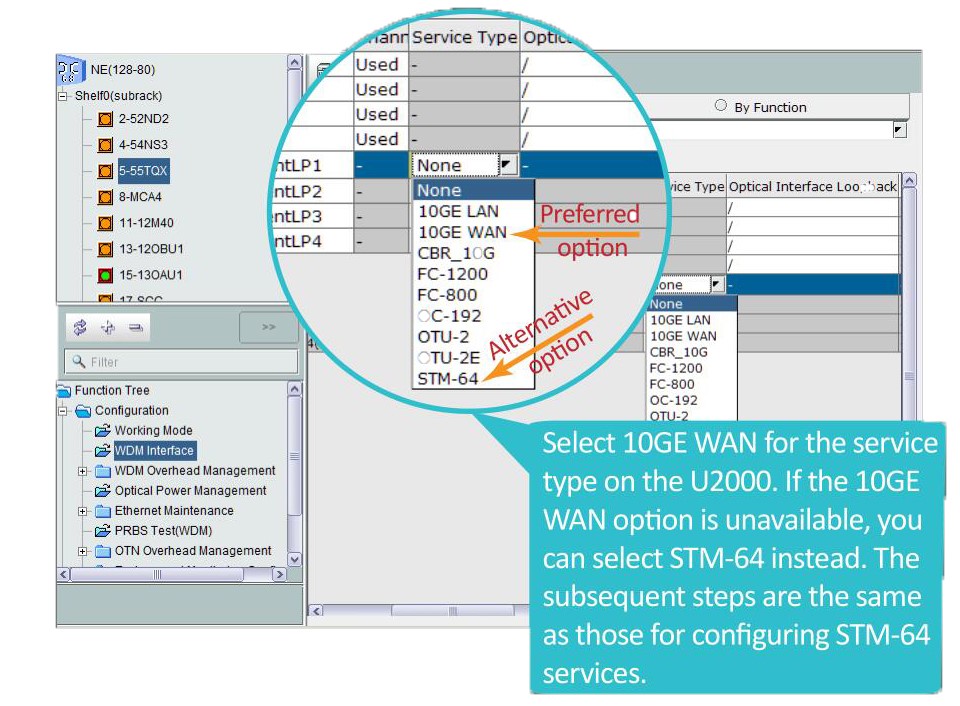
Let's take a look at the steps for configuring 10GE WAN services.


configuring 10G services


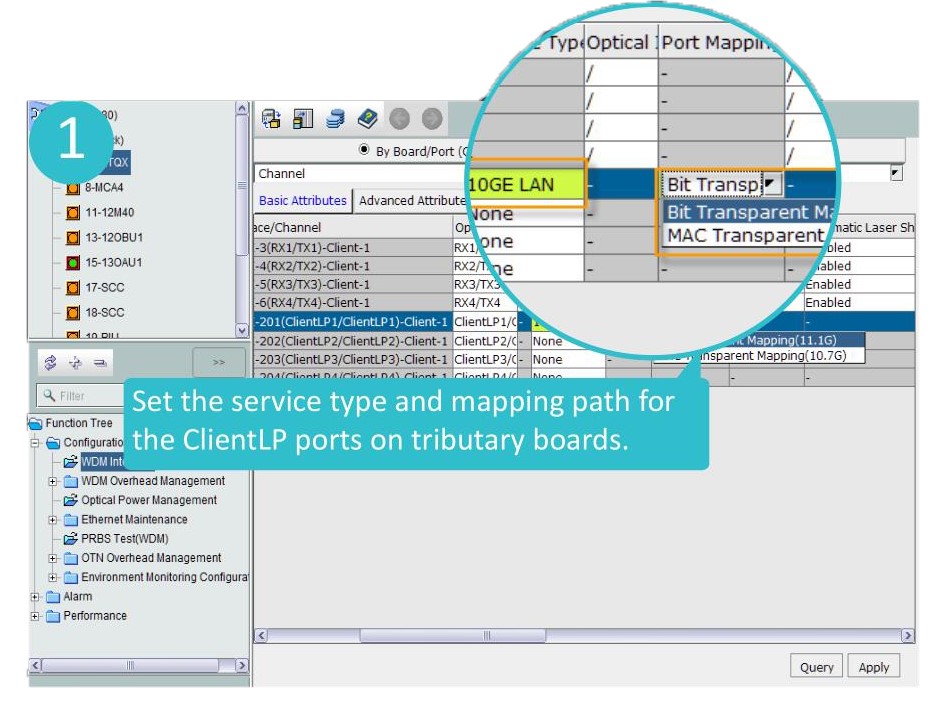
About the 10G LAN there are 2 types of  port mapping ((bit transparent mapping and MAC transparent mapping))

What is the difference between bit transparent mapping and MAC transparent mapping?

In bit transparent mapping (11.1G) mode, the OTU frame frequency is increased to ensure the encoding gain and error correction capability of the FEC function.Therefore, the service rate is OTU2e,which is higher than OTU2. This mapping mode is recommended for interconnection between Huawei devices.

In MAC transparent mapping (10.7G) mode, the GFP-F encapsulation mode is used to map 10GE MAC frames into OTU2 signals.

This mapping mode provides a standard service rate and therefore facilitates interconnection between Huawei devices and peer devices.

10GLAN port mapping

Wednesday, April 22, 2020

What is the Application of Huawei S9700 Switch in a Data Center?

This section describes the position of Huawei S9700 Switch in a data center.


The S9700 functions as a high-density 10G core or aggregation node in a large-scale data center, helping an enterprise build a highly reliable, non-blocking, and green data center network.

Figure 1 Position of the S9700 in a data center


As shown in Figure 1, on a data center network, NE routers function as the egress routers, S9700s function as core and aggregation switches to ensure network security and implement load balancing by using firewall and load balance service cards, and S6700s function as access switches to provide 10 Gbit/s access.

The S9700s use CSS technology to ensure high reliability. When a switch is faulty, the other switch takes over services on the faulty switch. The S9700s achieve link-level reliability by using Eth-Trunk. Reliability protocols such as STP and VRRP are not required, configuration and maintenance are simplified, and configuration errors are reduced.

The S9700 employs various technologies including hardware-based OAM/BFD, VRRP, E-Trunk, and IP FRR to ensure service continuity.

The S9700 supports 480 high-density 10GE ports and uses compact chassis and left-to-rear air channels to increase cabling capability, reduce switch size, and reduce power consumption.

Thursday, April 9, 2020

How to Check Huawei NE40E Board Registration Status?

When new Huawei NE40 router installed and configured in new site, you need to check whether all boards are properly installed and work normally. This article mainly talk about how to check NE40E boards including including main control boards and service boards registration status.


Huawei NE40E-X8


Prerequisites

Logging In to the NE40E is complete.

Procedure

  1. Run the display device [ pic-status | slot-id ] command to view information about the components installed on the NE40E. If [ pic-status | slot-id ] is specified, the command will display information about the broads.

    <HUAWEI> display device 
    NE40E-X16's Device status:
    -----------------------------------------------------------------------------
    Slot #   Type Online     Register     Status     Role   LsId   Primary
    -----------------------------------------------------------------------------
      1      LPU  Present    Registered   Normal     LC     0      NA 
      7      LPU  Present    Registered   Normal     LC     0      NA 
      17     MPU  Present    Registered   Normal     MMB    0      Master 
      18     MPU  Present    Unregistered Abnormal   MMB    0      NA 
      19     SFU  Present    Registered   Normal     OTHER  0      NA 
      20     SFU  Present    Registered   Normal     OTHER  0      NA 
      21     SFU  Present    Registered   Normal     OTHER  0      NA 
      22     SFU  Present    Registered   Normal     OTHER  0      NA 
      23     CLK  Present    Registered   Normal     OTHER  0      Master 
      24     CLK  Present    Unregistered Abnormal   OTHER  0      NA 
      25     PWR  Present    Registered   Abnormal   OTHER  0      NA 
      27     FAN  Present    Registered   Normal     OTHER  0      NA 
      28     FAN  Present    Registered   Normal     OTHER  0      NA 
      31     FAN  Present    Registered   Normal     OTHER  0      NA 
      32     FAN  Present    Registered   Normal     OTHER  0      NA 
      33     PMU  Present    Registered   Normal     OTHER  0      Slave 
      34     PMU  Present    Registered   Normal     OTHER  0      Master 
    -------------------------------------------------------------------------------
    Pay attention to the Register and Status fields in the displayed information.
    • Register field: indicates whether a component is successfully registered. The field value can be Registered or Unregistered. Registered indicates that a component is successfully registered. Unregistered indicates that a component is not registered.
    • Status field: indicates the component status. The field value can be Normal or Abnormal.

    If the Register field values are Registered and the Status field values are Normal, as shown by the characters in boldface in the preceding displayed information, go on with the subsequent commissioning.

Troubleshooting

If the interface board or SFU like NE40E-X8 200Gbps Switch Fabric Unit CR5DSFUIE07C is not registered, perform the following operations:

  1. Check that the start-up time of the board has expired.

    The time required for a board to complete registration after it is powered on is called the start-up time.

    Normally, an LPU can complete the start-up process within 5 minutes. If the system software and related files need to be updated, an LPU can complete the start-up process within 10 minutes.

    Normally, an SFU can complete the start-up process within 2 minutes. If the system software and related files need to be updated, an SFU can complete the start-up process within 5 minutes.

    Wait until the start-up time expires. If the board is still unregistered when the start-up time expires, go to Step 2.

  2. Check that the board type is supported by the system software.

    Supported board types vary with system software versions. For the types of boards that are supported by this software version, see the chapter titled "Boards" in the HUAWEI NetEngine40E Universal Service Router Hardware Description.

    If the board type is supported by this system software version but the board cannot be registered, go to Step 3.

  3. Check that the board has been powered on.

    Run the power on slot ? command in the user view. If "<null>" is displayed, all boards have been powered on.

    If the slot number of the board is displayed, the board is not powered on. Check whether the power supply of the slot where the board resides is normal. If the indicator on the board is on, the power supply of this slot is normal.

    • If the power supply of the slot is abnormal, contact Huawei technical support personnel.
    • If the power supply of the slot is normal but the system still informs that the board is not powered on, the power module on the board is faulty. In this case, you need to replace the board.

    If the power supply of the slave MPU is normal but the board still cannot be registered, go to Step 4.

  4. If a new board cannot be registered, remove the board and then insert it back. If the board still cannot be registered, go to Step 5.

  5. Collect the following information and contact Huawei technical support personnel:

    • Results of the preceding operation procedure.
    • Configuration files, log files, and alarm files of the NE40E
After checked all boards are power on and are in normal staus, then you can configure relative service according to your needs; if there exist some technical problem, you can contact supports@thunder-link.com.

Tuesday, March 24, 2020

Introduction for HUAWEI Access Network GPON Networking Protection

GPON network is the mainstream nowadays, GPON networking protection is very important. Below are introductions of networking protection.

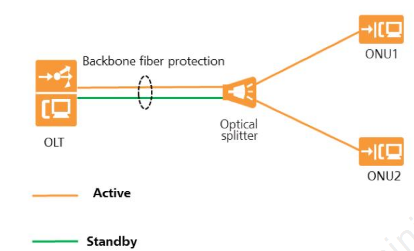
Type B Single-homing Protection
·        Type B protection is implemented for different PON port on the same Huawei MA5800 GPON OLT or MA5600T GPON OLT

                                             
type single homing


·        Advantages: The networking, OLT/ONU management, and service provisioning are simple.

·        Disadvantages: If the OLT is faulty, services are interrupted. Optical fibers are usually laid in the same pipe, and two optical fibers may be disconnected at the same time.

·        Application scenario: Protects important services of users, such as enterprise private line access services and base station private line access services.


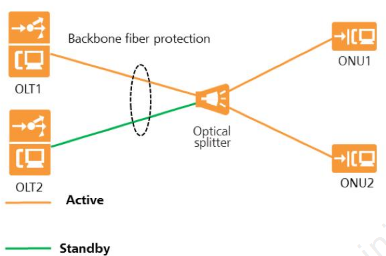
Type B Dual-homing Protection
·        Type B dual-homing protection is implemented for PON ports of two OLTs

Advantages: Two backbone optical fibers are connected to two OLTs to implement remote disaster recovery.

Disadvantages: The networking is complex, the cost is high, and the OLT configuration is complex.

Application scenario: Protects important services such as enterprise private line access services and base station private line access services, especially in scenarios where remote disaster recovery is required.
ty b dual homing

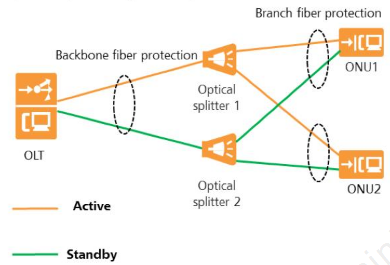
Type C Single Homing Protection
Type C protection is similar to ring protection implemented for the OLT, ONU and optical splitter.
                                             
type c single homing


·        Advantages: The networking and OLT/ONU management is simple.

·        Disadvantages: If the OLT is faulty, services are interrupted. Optical fibers are usually laid in the same pipe, and two optical fibers may be disconnected at the same time.

·        Application scenario: Protects important services of users, such as enterprise private line access services and base station private line access services.

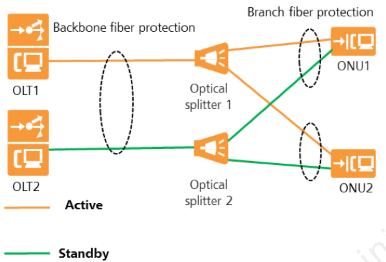
Type C Single Dual-homing Protection
type c dual homing


·        In dual-homing networking, the two PON lines between the ONUs and two OLTs are in the active/standby state and cannot forward packets at the same time.

·        Advantages: When the upstream link of the OLT or OLT is faulty, services can be switched to the other OLT.

·        Disadvantages: The networking is complex, the cost is high, and the ONU management is complex.

·        Application scenario: Protects power supply as well as enterprise private line access services and base station private line access services
Wednesday, March 11, 2020

Does 100G OTN Tributary Board TSC Have Corresponding Cross-connect Board on Huawei OSN8800?

Huawei OSN 8800 100G tributary board is TSC, it has two functional version TN54 and TN55.  TN55TSC can be created as TQX on the NMS and  it can replace TN54TSC without any software upgrade. After substitution, the TN55TSC functions as the TN54TSC.


Below are Mapping between TSC board and OSN 8800 equipment:


Expect for equipment mapping, OSN 8800 T64 T32 T16 have their coresponding cross-connect boards, then how about TSC, does it also have coresponding cross-connect board? Answer is YES.

For an enhanced OptiX OSN 8800 T64 subrack, the TSC board must work with TNK2USXH+TNK2UXCT boards.

For an enhanced OptiX OSN 8800 T32 subrack, the TSC board must work with the TN52UXCH or TN52UXCM board.

For an OptiX OSN 8800 T16 subrack, the TSC board must work with the TN16UXCM board.

Thunder-link.com supplies full series OSN8800 OSN6800 boards with test report and technical supports, if you have any problem, you can contact us.
.


Wednesday, March 4, 2020

How to deal with Abnormal Switching of SNCP service on ONT line board NS4 of Huawei OSN8800?

This is a case about handling abnormal switching of SNCP service on ONT line board NS4 of Huawei OSN8800.

Problem Description
100G line board TN54NS4 of a customer is configured with SNCP services. It is reported that multiple abnormal switching occurs on the live network, no fiber cut occurs on the optical cable, and the optical power is normal. Therefore, the root cause analysis needs to be performed.
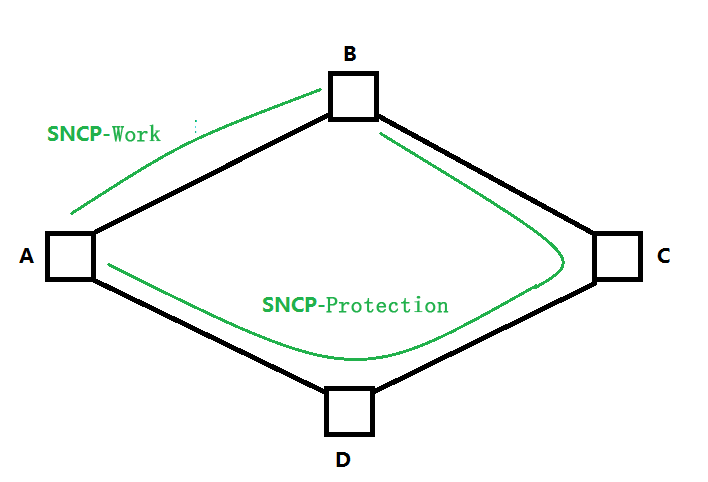
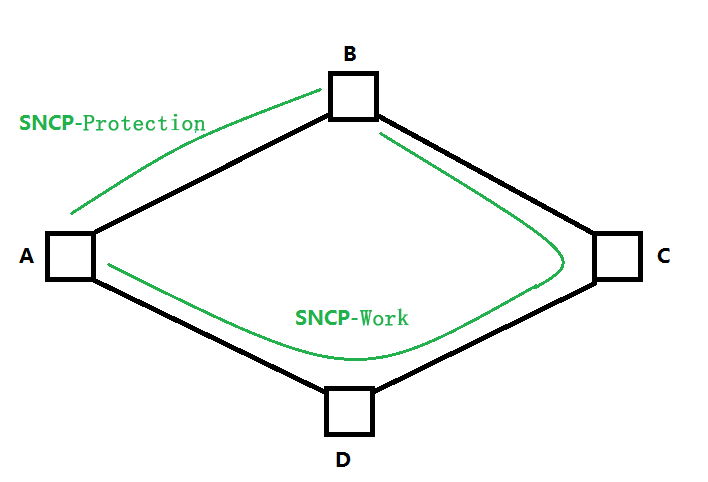
The networking is as follows:
11
Alarm information:
ODU_SNCP_PS
Handling Procedure
1. Query the NMS alarms. It is found that the ODU_SNCP_PS alarm occurs multiple times and the SNCP switching occurs.
2. Check the current and historical alarms of the device. It is found that no fiber cut alarm is generated.
3. Continue to check the receive optical power of TN54NS4. It is found that the receive optical power is stable. Therefore, the switching is not caused by the bit errors caused by the power jitter.
4. According to the networking analysis (as shown in the following figure), it is found that SNCP switching occurs at a certain time, and services are switched from SNCP-to SNCP-protection. The switching cause may be caused by bit errors on the line. Because there is only one span between A-B, it can be confirmed that the problem is caused by this span.
22
5. The customer performed an OTDR test on the optical cable between the site A and the site B. It was found that the problem was caused by the reflection point of the optical cable.

6. The reflection point has a hop contact. After the connector is cleaned, the OTDR test shows that the reflection is normal and the SNCP switching is normal.
Root Cause
The fiber jumper connector is faulty. As a result, bit errors occur due to reflection and SNCP switching is triggered.
Suggestions and Summary
1. Alarm, performance, and optical power are the basic methods for locating WDM problems.


2. Common factors related to bit errors on the line side: a, non-linear effect; b, there is an abnormal reflection point on the line side

If you encounter same issue about NS4, you can refer to this article, it would be helpful.