Thursday, November 9, 2023

How to Identify Huawei-Certified Switch Optical Modules

  • A switch must use optical or copper modules that have been certified for use on Huawei S switches. Non-certified optical or copper modules cannot ensure transmission reliability and may affect service stability. Huawei is not liable for any problem caused by the use of non-certified optical or copper modules and will not fix such problems.

  • The methods provided here are only for reference. To confirm whether optical modules you are using have been certified for use on Huawei S switches, contact Huawei technical support.

10GE or Lower Speed Optical Modules

Huawei started certification on 10GE or lower speed optical modules for S switch products on July 1, 2013.

To determine whether optical modules delivered for Huawei S switches before July 1, 2013 are certified ones, contact Huawei technical support.

If your optical modules are delivered after July 1, 2013, use either of the following methods to determine whether they have been certified by Huawei.

Method 1: Check for "HUAWEI" on the label

If an optical module has been certified by Huawei, its label contains "HUAWEI", as shown in Figure 10-1.

Figure 10-1 "HUAWEI" on the label of a Huawei-certified S switch optical module

Method 2: Run the command

An optical module has received Huawei S switch certification if it meets the following conditions:

For a device running V200 version:

  • In the display elabel command output, the Manufactured field displays a date later than 2013-07-01.

  • In the display version command output, the displayed version is V200R001C00 or later.

  • In the display transceiver command output, the Vendor Name field displays HUAWEI.

The SFP-FE-SX-MM1310 (part number: 02315233) is a Huawei-certified 100M optical module. However, the Vendor Name field displays the original manufacturer name, instead of HUAWEI.

For copper modules, the Vendor Name field also displays the original manufacturer name, instead of HUAWEI.

25GE, 40GE, and 100GE QSFP28 Optical Modules

Huawei started certification on 25GE, 40GE, and 100GE optical modules for S switch products on January 1, 2016.

To determine whether optical modules delivered for Huawei S switches before January 1, 2016 are certified ones, contact Huawei technical support.

If your optical modules are delivered after January 1, 2016, use either of the following methods to determine whether they have been certified by Huawei.

Method 1: Check for "HUAWEI" on the label

If an optical module has been certified by Huawei, its label contains "HUAWEI", as shown in Figure 10-1.

Method 2: Run the command

A 25GE, 40GE, or 100GE optical module has received Huawei S switch certification if it meets the following conditions:

For a device running V200 version:

  • In the display elabel command output, the Manufactured field displays a date later than 2016-01-01.

  • In the display version command output, the displayed version is V200R008 or later.

  • In the display transceiver command output, the Vendor Name field displays HUAWEI.

For the optical modules connected to high-speed cables or AOC cables, the Vendor Name field displays the original manufacturer name, instead of HUAWEI. For the methods of checking whether such an optical module has been certified by Huawei, contact Huawei technical support personnel.

Wednesday, October 25, 2023

What is the difference between the firewall and IPS?

The article Comparison and Differences Between IPS vs IDS vs Firewall vs WAF briefly introduces the differences between IPS, IDS, WAF, and the firewall. But there are many details that are not included. Especially the difference between firewall and IPS/IDS. In this article, we will introduce in more depth the difference between IPS and firewall as a security defense product.

Firewall

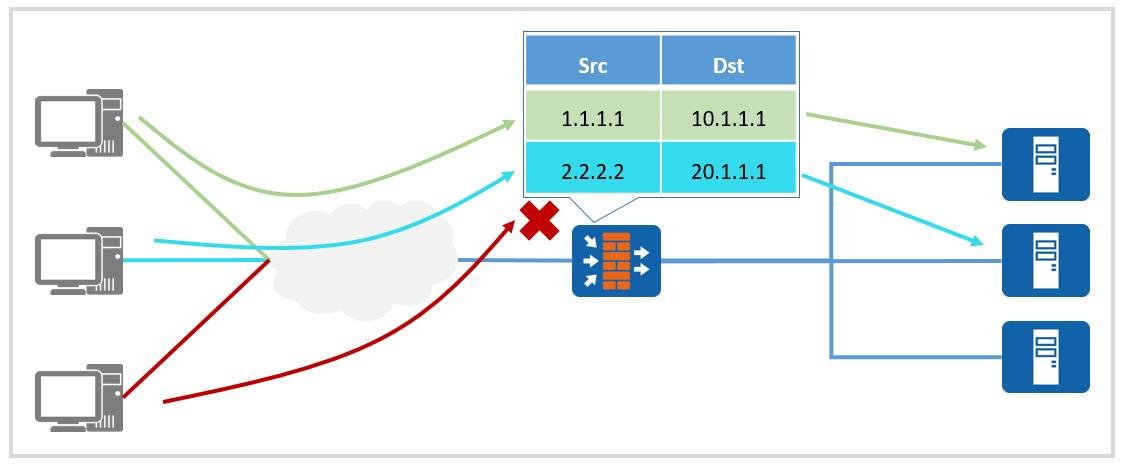
The current mainstream fire protection uses the state detection function to check the legitimacy of the link state of the message, and discard the message with the illegal link state. The core basis is the session state. When user traffic that meets the access conditions traverses the firewall for the first time, a session entry will be generated, and subsequent packets of the session will be forwarded based on this session entry.

firewall inspection

Figure 1: Firewall inspects the traffic based on the pre-configured security policy

Static security defense technology in the firewall: The firewall's judgment on whether the traffic is illegal is often based on the security policy pre-configured by the administrator, which cannot intercept some special attacks. For example, traditional firewalls cannot intercept XSS attacks and SQL injection attacks against web servers.

IPS/IDS

To put it simply, IPS is an advanced version of IDS, which can not only detect threats like IDS, but also block intrusion traffic in real-time, thereby preventing greater losses in time.

Compared with passive detection firewalls, the biggest difference of IPS is its active detection.

Intrusion detection technology enables the security system to respond in real-time to the time and process of intrusion by studying the process and characteristics of intrusion behavior. The technologies used by IPS can be divided into:

1. Anomaly detection: The assumption of anomaly detection is that the activities of the intruder are abnormal from the activities of the normal subject, and an "activity profile" of normal activities is established. When the current subject's activity violates its statistical law, it is considered to be an "intrusion" behavior.

2. Feature detection: Feature detection assumes that the activity of the intruder can be represented by a pattern, and the goal of the system is to detect whether the activity of the subject conforms to these patterns. Feature detection requires signature library support.

ips inspection

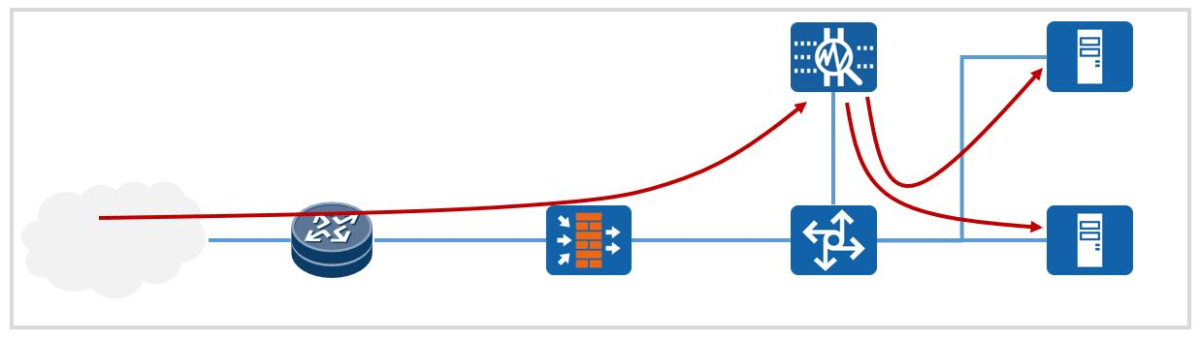
Figure 2: One of the IPS implement location

Usually, IPS adopts the feature detection mode. At this time, the IPS will perform feature inspection on all traffic and block the traffic that meets the intrusion characteristics. Since the signature database can be updated in real-time from the official website of the equipment supplier, IPS can often detect intrusions in a more timely manner.

In addition, as a border device, the firewall distinguishes different areas by zone but does not detect traffic in the same area. This leaves nothing for the attacks launched within the intranet. However, IPS is often deployed at key nodes through which all traffic flows. In addition to detecting external attacks, IPS can also respond to internal attacks.

Why can the firewall also perform content security detection?

For some scenarios where the business volume is not large, deploying IPS and firewalls separately will bring huge hardware cost pressures to the company. In order to alleviate this situation, many manufacturers have introduced firewalls that integrate content security detection, such as Huawei's USG firewall. Based on the security detection and processing capabilities of traditional NGFW firewalls, these devices also support the security analyzer HiSec Insight ( Also known as CIS), FireHunter sandbox, security controller SecoManager and other network security devices are linked, using intelligent detection technology to effectively detect and proactively defend against advanced threats. However, compared to separate IPS devices, these integrated firewalls tend to be slightly inferior in processing performance. 

In conclusion

 Table 1: The difference between Firewall and IPS


Firewall

IPS

Basis   for inspection

Pre-configured security policy

Signature

Deployment   location

Network boundary

Intranet backbone node

Timeliness

Security policy updates rely on   administrators

Fast update of signature database

Detection   flow

Cross-region traffic

All traffic

Performance   requirements

Need high hardware

Need high-performance hardware to support   real-time detection and forwarding

Advantage

Other functions can be integrated,   cost-effective

Active detection, strong detection   ability


Huawei hot-sell firewall USG6615E-AC, USG6630E-AC, USG6620E-AC supplying at Thunder-link.com.

Friday, October 20, 2023

Why NE40E CPU usage raise too high?

Fault description

The customer reports that the CPU usage of Huawei NE40E-X3 raise too high, which reaches 60%


Processing procedures

1. Check the CPU usage to locate which tasks are using a lot of CPU resource.


<NE40E-X3>dis cpu-usage
Cpu utilization statistics at 2019-02-22 15:10:26 916 ms
System cpu use rate is : 74%
Cpu utilization for five seconds: 72% ;  one minute: 65% ;  five minutes: 77%.
Max CPU Usage : 99%
Max CPU Usage Stat. Time : 2018-09-10 18:58:15 410 ms
---------------------------
ServiceName UseRate 
---------------------------
SYSTEM           40%
BRAS             26%
CMF               3%
FEC               3%
IP STACK          2%
AAA               0%
ARP               0%


The result shows that the BRAS service and system service occupy massive CPU resource.

It’s suspected that the BRAS related configuration or device fault cause the error.


2.  Check boards health in the device


<NE40E-X3>dis health
----------------------------------------------------------------
Slot                       CPU Usage  Memory Usage(Used/Total)
----------------------------------------------------------------
4      MPU(Master)            53%          38%  1562MB/4022MB
1      LPU                    39%          22%   859MB/3736MB
3      VSU                     3%          14%   509MB/3545MB
5      MPU(Slave)              18%         31%   1274MB/4022MB
----------------------------------------------------------------


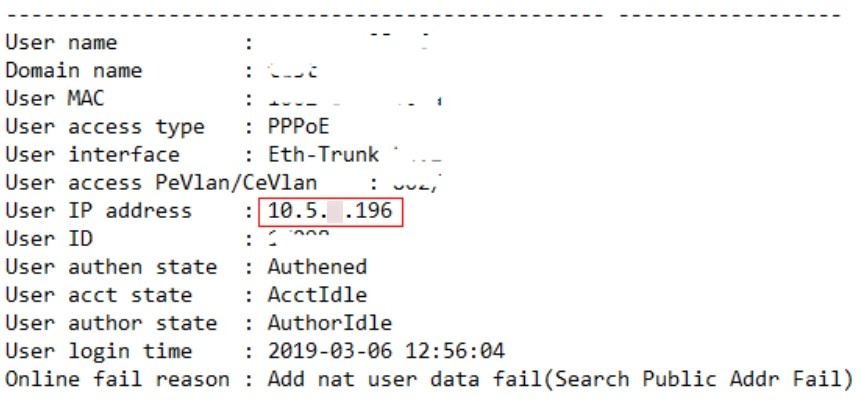
3.  Check the services implemented on the boards, found that misconfiguration cause a lot of users cannot online, which cause high CPU usage, after modifying the configuration.


Root Cuase

Misconfiguration cause a lot of users cannot online, which cause high CPU usage.

cpu high

Previous configuration:

acl 3001
 rule 5 permit ip source 10.5.x.0 0.0.0.255


Modified configuration:

acl 3001
 rule 5 permit ip source 10.5.x.0 0.0.255.255

Solution

The misconfiguration cause massive users cannot get online which generates massive re-authentication messages, as a result, the device CPU is exhausted.

Tuesday, September 19, 2023

SUBCARD MISMATCH in DAP Board

Description

As Huawei OTN OSN series support using NE as SDH, PTN, DWDM, OTN and POTN. we installed MUX/DEMUX MR8 and B1DAP amplifiers to better utilize the installed OSN 1800 V NEs, The DAP boards support 2 small slots each one can house an amplifier unit totally dependent of the unit in the other slot, but after installing the boards and Sub_boards ((OAC and OBC)) , An alarm raised (SUBCARD_MISMATCH) the alarm source is the DAP boards.

The alarm doesn’t affect services.

SUBCARD_MISMATCHSUBCARD_MISMATCH


Procedures of Check 

1- first I checked the board software and hardware version with NE version, But I found that NE software is supporting boards and sub boards also.


2- By checking the alarm in the information center, it was mentioned that there is a problem with logical ports whether added wrongly or missed.

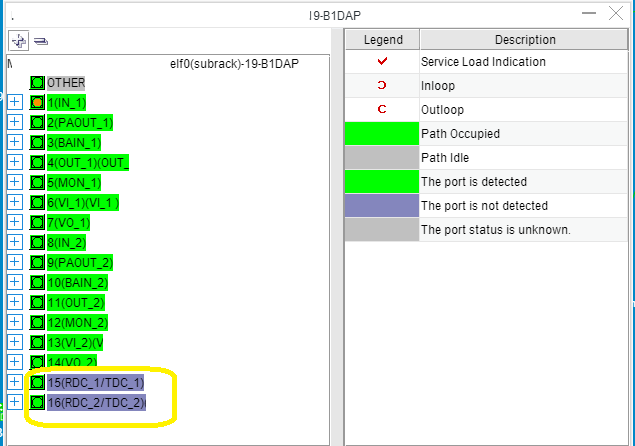
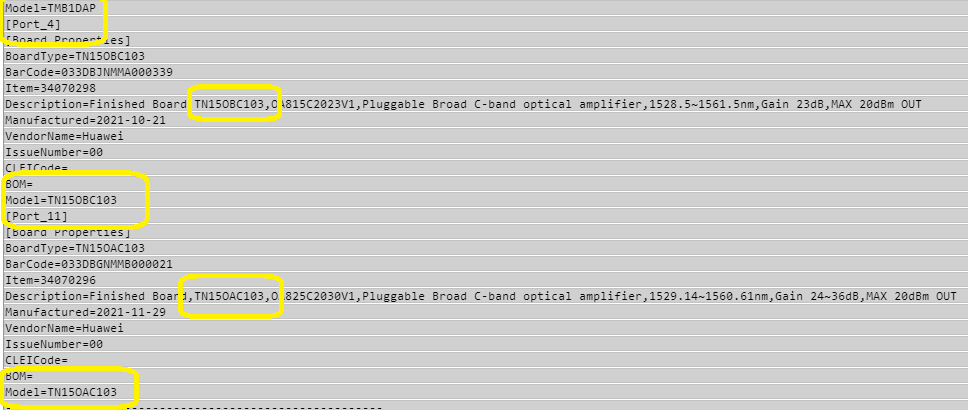
The logical  ports could be checked from the board panel, so I checked the DAP panel and found the TDC/RDC logical ports are added as 15 and 16  ports, The TDC/RDC number 15 is related to the 1st  slot in DAP board and The TDC/RDC number 16 is related to the 2nd slot in the DAP board.


RDC/TDC

RDC/TDC

-As known the TDC /RDC ports are intended for DCM (Dispersion Compensation Module) connection used in the OAC amplifier unit only, so the RDC/TDC unit should not be added for the subslot uses OBC unit.

- To check which kind of amplifiers are installed in the sunboards, I used the board Manufacturer report and found that 1st slot houses OBC unit and the 2nd slot is equipped with OAC unit.


Manufacturer Report

Manufacturer Report


Solution 

As the OBC doesn’t need the logical ports of the RDC/TDC ,So I deleted them from logical ports number 15 in  the board panel and then the alarm cleared.

Thursday, September 14, 2023

NTP (Network Time Protocol) - (S6720 Configuration)

NTP, or Network Time Protocol, is a network protocol widely used to synchronize the clocks of computers and other devices on a network. It plays a key role in maintaining time accuracy in computer systems and network communications, ensuring that different devices are synchronized with respect to a common reference time.


If a router has the wrong time, it can lead to several issues and complications in network operations and services. The accuracy of the time on a router is crucial for various network functions and security measures. Here are some problems that can arise if a router's time settings are incorrect:

Router logs and event timestamps may be inaccurate, making it challenging to troubleshoot network issues or identify security incidents. Accurate timestamps are essential for diagnosing problems and tracking events.


  • Log and Event Timestamp Inaccuracy: Inaccurate timestamps in logs and events make troubleshooting difficult and hinder identifying the root causes of issues.
  • Security Vulnerabilities: Incorrect router time can lead to security vulnerabilities, affecting authentication, encryption, and secure communications.
  • Access Control Issues: Network access control systems may malfunction, leading to improper enforcement of access policies and permissions.
  • Certificate Validation Errors: SSL/TLS certificates may fail validation, causing connectivity issues and security warnings.
  • Authentication Failures: Authentication protocols relying on time-based elements, like RADIUS and TACACS+, may not function correctly.
  • Logging and Compliance Violations: Non-compliance with regulations, like PCI DSS or HIPAA, due to inaccurate timestamps in logs and records.
  • Backup and Restore Challenges: Backup and restore operations may become complicated, impacting data recovery and backup management.
  • Network Synchronization Disruption: Inaccurate time settings can disrupt network synchronization, leading to inconsistencies across the network.
  • Delays in Troubleshooting: Accurate timestamps are vital for troubleshooting network issues. Incorrect timestamps can cause delays in diagnosing and resolving problems.
  • Event Correlation Difficulty: Event correlation becomes challenging without accurate timestamps, affecting the identification of the root causes of network problems.


How NTP works:


NTP Server Clock: A reference NTP server, usually called "stratum 0", has a high-precision clock, such as an atomic clock or GPS, which provides the precise time.


Server Hierarchy: NTP uses a hierarchy of servers to distribute time. Top-level servers (stratum 1) synchronize their clocks with accurate time sources, while lower-level servers (stratum 2, stratum 3, etc.) synchronize with higher-level servers.


Requests and Responses: Devices that want to synchronize their clocks send requests to NTP servers. NTP requests are short messages that include information about the current time of the device making the request.


Time Adjustment: The NTP server receives the requests and responds with time information, including the deviation between the server's time and the requesting device's time. The requesting device uses this information to adjust its local clock.


Adjustment Algorithm: NTP uses a sophisticated algorithm to calculate the travel time of the request between the device and the server and, based on this calculation, adjusts the clock of the requesting device to be closer to real time.


Server selection: Devices usually have several options for NTP servers from which they can synchronize. They select servers based on criteria such as the server's clock accuracy and network latency.


Continuous Monitoring: NTP also includes continuous monitoring mechanisms to adjust the clock as time passes, keeping it accurate.


The result of this process is a network of devices with synchronized clocks, which is essential for many aspects of computing and network communications. This is particularly important in applications that depend on accurate event records, such as security systems, financial transactions, telecommunications and even the precise synchronization of satellite systems and telecommunications networks. NTP helps ensure that all these operations take place based on a common and reliable time.


If we search the Internet we can find some servers that are available for use.


Now let's configure the IP of the NTP service on our S6720-30C-EI-24S-AC switch. I love this equipment!


1702237864756121600


Our NTP service will run on the Meth0/0/1 interface and on a vpn-instance named vrfMGMT.


1702237863783043072

Switch layer2 or layer3 which one to choose and why?

An Ethernet switch performs several tasks, including creating VLANs.  However, there are two types of switches: Layer 2 (L2) and Layer 3 (L3) and both are networking devices, but they operate at different layers of the OSI (Open Systems Interconnection) model and serve different purposes. 


First, a small summary about VLANs VLANs are like islands within a network. Equipment on one "island" does not have direct access to equipment on another. Thus, VLANs create isolation between parts of the network, even if the equipment is connected to the same switch.


However, sometimes it is necessary to have some communication between different VLANs. Either to access a server (communication between the users' VLANs and the servers' VLAN), or to access the Internet (communication between the users' VLANs and the Internet exit router). And these are just a few examples of applications where we may need to "interconnect" these "islands".


Here's a comparison of the Layer 2 and Layer 3 switchs:
 

Layer 2 Switch:
1. Operating Layer: Layer 2 switches operate at the Data Link Layer (Layer 2) of the OSI model.
2. Function: They are primarily responsible for forwarding Ethernet frames based on the physical MAC (Media Access Control) addresses of devices on the network.
3. Forwarding Decision: L2 switches make forwarding decisions solely based on MAC addresses, creating a table that maps MAC addresses to specific switch ports (MAC address table).
4. Local Segmentation: L2 switches are used to segment a LAN (Local Area Network) into smaller collision domains, reducing network congestion and improving network efficiency.
5. Limited Routing: L2 switches do not perform routing functions. They are unaware of IP addresses or higher-layer protocols, making them less suitable for routing traffic between different IP subnets or VLANs (Virtual LANs).


Layer 3 Switch:
1. Operating Layer: Layer 3 switches operate at the Network Layer (Layer 3) of the OSI model.
2. Function: They combine the capabilities of traditional Layer 2 switching with some routing capabilities.
3. Forwarding Decision: L3 switches make forwarding decisions based on both MAC addresses and IP addresses. They maintain a routing table to determine the best path for IP packets.
4. Routing Between Subnets: L3 switches can route traffic between different IP subnets or VLANs, effectively acting as routers. This makes them suitable for interconnecting multiple subnets within a network.
5. Advanced Routing: Some Layer 3 switches support advanced routing protocols like OSPF (Open Shortest Path First) or BGP (Border Gateway Protocol), allowing them to participate in complex routing scenarios.
6. Network Segmentation: L3 switches can create multiple VLANs and route traffic between them, enabling network segmentation for security, performance, and management purposes.
7. More Complex Configurations: Configuring and managing Layer 3 switches can be more complex than Layer 2 switches due to the additional routing functionality.


A managed L2 switch allows the creation of VLANs, but does not interconnect them. So, if I have a network made entirely of L2 switches, I can create VLANs, but I can't make them communicate. I can even use a router (which is also a Layer 3 equipment) to interconnect the VLANs, but normally a router is an equipment that has a low packet switching capacity, or - translating into Portuguese - a router can become a bottleneck in communication between VLANs.


An L3 switch, on the other hand, is a switch that is the same as an L2 switch (it has ports, creates VLANs, manageability, etc.) but it has a functionality that L2 switches do not have: it allows VLANs to be interconnected.

One comment before we continue: an L3 switch is a router. Many people think that a router is just the equipment that connects to the Internet. Is not true. A router is any device that connects different networks. Thus an L3 switch is also a router. So when I said above that "..but normally a router is a piece of equipment that has a low packet switching capacity..." I wasn't being 100% honest with you, reader. A router (the type that connects a network to the Internet) is normally a piece of equipment with a lower switching capacity. However, an L3 switch is a router, which is "inside" the L2 switch (that is, it does everything that an L2 switch does) and has greater capacity. Let us now return to our subject.


So, with an L3 switch, the network administrator can - in an organized way - communicate between the VLANs. It is important that I can have multiple L3 switches or just one L3 on my network, even though I have multiple L2 switches.


If I have one L3 switch and several L2 switches, that L3 switch is typically the central switch. All inter-VLAN traffic passes through it.


If I have several L3 switches, the cost of my project is greater and also the configuration complexity is greater. However, with several L3s I share my load, so I can have better performance in the interconnection between VLANs.


Nowadays, most projects aim to connect users' VLANs with the servers' VLAN and the Internet, and nothing else. In other words, nowadays most projects do not need large arrays of L3 switches: several L2 switches connected to a central L3 switch (or if I want redundancies, connected to two central L3 switches) is enough for the vast majority of the projects.


Choosing Between L2 and L3 Switches:


Use L2 Switches When:
• You need basic Ethernet frame switching within a single VLAN or subnet.
• Network segmentation at the IP layer is not required.
• You want a simple and cost-effective solution for LAN connectivity.
 

Use L3 Switches When:
• You need to route traffic between different IP subnets or VLANs.
• Advanced routing features like OSPF or BGP are required.
• You want to create a more secure and segmented network.
• You need efficient routing within your LAN, especially in environments with heavy inter-VLAN traffic.


In practice, many modern network switches are capable of both Layer 2 and Layer 3 operations, allowing network administrators to choose the appropriate mode based on their specific requirements. These switches are sometimes referred to as "multilayer switches." The choice between L2 and L3 switches depends on the complexity and goals of the network design.


If you have needs for Huawei switch like S5720 S6720 S6730 amd other data center switch, you can contact thunder-link.com.