Showing posts with label HUAWEI MA5680T. Show all posts

Thursday, December 29, 2022

OLT enable MAC Address Anti-Floating Cause BRASs become Double VRRP Master

Problem Description

When two BRASs are connected through one OLT, occur VRRP became two masters.


Handling Process

1. Two BRASs are in the master state. This is because the VRRP packets sent from the active BRAS to the standby BRAS are discarded on the OLT side. The standby BRAS consider that the active BRAS is faulty and then becomes the active BRAS. Perform ACL statistics on the OLT. It is found that the port connected to the active BRAS receives VRRP packets.

 

1


Perform mirror on the OLT Huawei MA5680T for example port connecting the standby BRAS. It is found that VRRP packets are not sent out. Therefore, packets are lost on the OLT, as shown in the following figure.
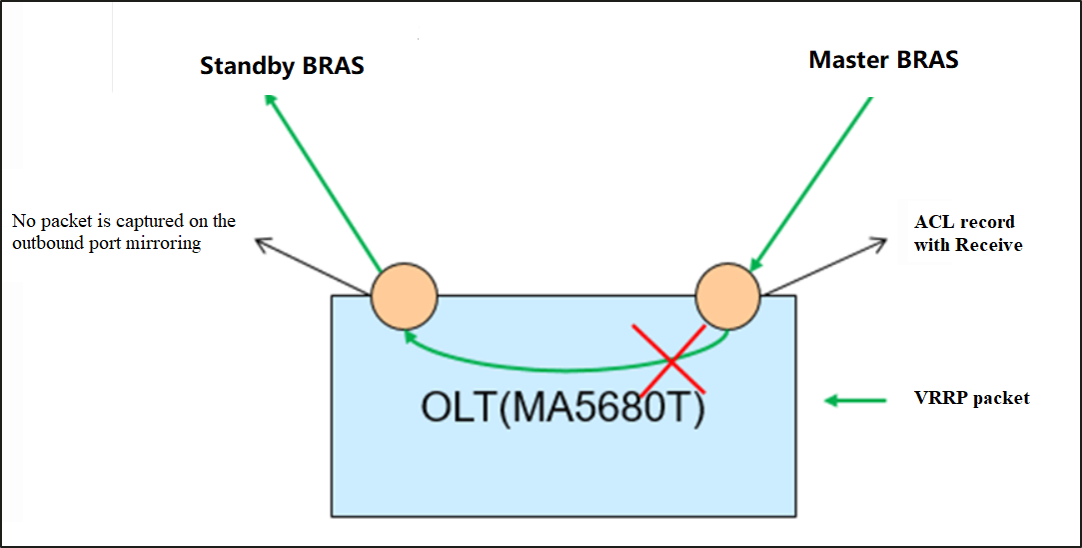
 

1


2. The OLT discards VRRP packets sent from the active BRAS to the standby BRAS because anti-MAC address flapping is enabled. The port connected to the standby BRAS learns the virtual MAC address first, and then receiving a VRRP packet with the same virtual MAC address on master BRAS, master BRAS discards the packet due to a MAC address learning conflict.


Query the MAC address on the OLT. It is found that the virtual MAC address of the VRRP packet is learned on the port connected to the standby BRAS. The anti-MAC flapping function is enabled on the device. Therefore, the virtual MAC address of the VRRP packet is configured as a static MAC address to prevent flapping to other ports.
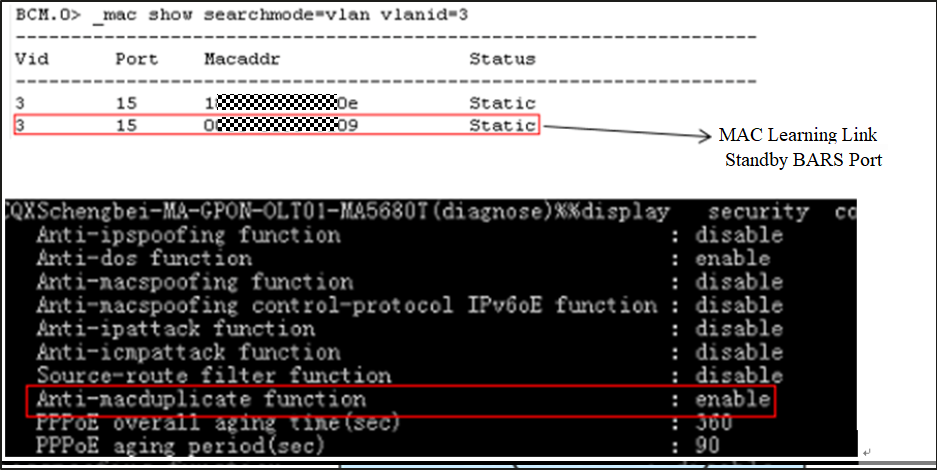
 

1


The virtual MAC address is learned on the port connected to the standby BRAS because the optical path between the active BRAS and the OLT is interrupted. As a result, services are switched to the standby BRAS, and the MAC address of the original port is deleted. The re-learning is performed on the port connected to the standby BRAS. After the optical path on the active BRAS recovers, the interface connected to the active BRAS receives a VRRP packet with the same virtual MAC address. In this case, the interface discards the VRRP packet because of a MAC address learning conflict.


Root Cause 

When two BRASs are connect through an OLT, they use the same virtual MAC address. The MAC address anti-flapping function is enabled on the OLT. After the port connected to the standby BRAS learns the virtual MAC address, the port connected to the active BRAS receives the VRRP packets with the same virtual MAC address. As a result, the port directly discards the VRRP packets due to MAC address learning conflicts. As a result, the standby BRAS fails to receive VRRP heart-beat packets from the active BRAS and becomes the active BRAS

Solution

Run the following command to disable the MAC address anti-flapping function on the OLT:

(config)#security anti-macduplicate disable

Wednesday, August 8, 2018

How to realize flow qos mode configuration on Huawei MA5680T GPON?

For realize scheme with two flows Huawei MA5680T GPON i create new gpon-line profile with these settings:

ont-lineprofile gpon profile-id 10 profile-name "Flow-Test"
qos-mode flow-car
mapping-mode vlan-priority
tcont 1 dba-profile-id 10
gem add 1 eth tcont 1
gem mapping 1 0 vlan 1001 priority 0
gem mapping 1 1 vlan 1001 priority 5
commit

It means, that we use 1 gemport, but mapping it with different mapping index for priority 0 and 5.

After that we create service port for this gemport and Huawei ONT with unlimited traffic-table index 6 with priority policy Tag-In-Package:

service-port 1 vlan 1001 gpon 0/5/0 ont 1 gemport 1 multi-service user-vlan 1001 tag-transform translate inbound traffic-table index 6 outbound traffic-table index 6

That's all, during test we can see, that flow with priority 5 has superior between flow with 0 priority.

For more questions or inquiry about Huawei OLT/ONT, Switch and Router, please contact Thunder-link.com technical support team.

Wednesday, March 22, 2017

How to Search Out the Resource License Fast in a PO?

Q:
Both the resource license for the U2000 software and the NE licenses for hardware devices are contained in a purchase order (PO). The numerous NE licenses in the PO make it difficult to search out the resource license fast.
Alarm Information
None
Handling Process
    A:
In the advanced search window of the FNO system, you can enter multiple search criteria, such as the PO, product name, product version and site information. In this manner, the required license can be located accurately.
Note:
NE licenses are licenses for network hardware devices. Currently, hardware devices can control functions by using NE licenses without executing license policies. Therefore, hardware devices need not use 
license files. The resource license is a license for the U2000 software used to manage specific NE or port resources on the U2000. Usually, the devices at a site share a PO. If capacity expansion is performed at the site, the NE licenses and the resource license that is used to manage those devices will be combined in one PO. As a result, a PO in the FNO system contains numerous NE licenses and one resource license for managing those devices.
Step 1  At the FNO website, click the button highlighted by the red oval as shown in Figure 1-1(check the attachment Figure 1-1 Manage entitlements).
Step 2  In the dialog box that is displayed, enter multiple search criteria as shown in Figure 1-2(check the attachment Figure 1-2 advanced search).
Root Cause
None
Suggestions
None 

More related:

Huawei MA5683T

Huawei MA5680T


Monday, March 20, 2017

Ethernet configuration missing in NMS but normal when testing

Issue Description
Ethernet configuration missing in NMS, already configured at both site. However, when do testing end to end, no faulty alarm at test gear. The services still exist, if not, test gear will show faulty alarm. 
Alarm Information
No Alarm.
Handling Process
1, Current version U2000 V1R3C00SPC100 is upgrading to V1R5C00SPC600 as recommended by R&D.
2, After NMS restart, all Ethernet configurations appear normally.
Root Cause
1, Configuration not seen at NMS, but when test it normal, mean at NE side services were normal.
2, Services only cannot see at NMS side, mean problem probably related to NMS.
3, NE can login and communicate normally, means NMS and NE can communicate normally.

4, Collect data and send to R&D.
5, Feedback from R&D, probably the current NMS version have some bug which cannot support some features of NE or the version of NE and NMS may not compatible. R&D recommended version V1R5C00SPC600 to upgrade.

Suggestions
1, for new version of NE, always uses the latest NMS version to avoid some operations and monitoring failure.
2, V1R5C00SPC600 version is the latest recommended by R&D to use.

More related articles:

MA5600T Series LACP Configuration

MA5600T Series Equipment Downgrade Guidebook

How to configure DHCP on OLT