Note:
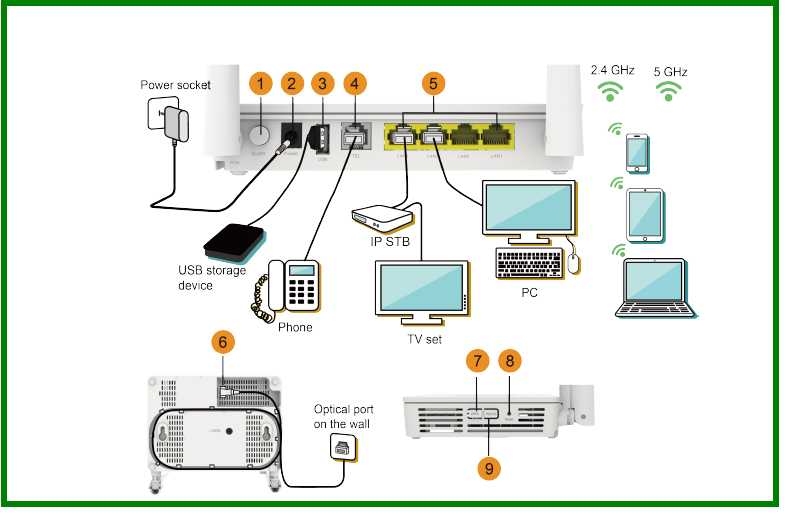
1. The fiber connector connected to the optical port on the wall varies depending on actual conditions.
2. To ensure the normal use of fibers, make sure that the fiber bending radius is larger than 30mm.
Note:
1. The fiber connector connected to the optical port on the wall varies depending on actual conditions.
2. To ensure the normal use of fibers, make sure that the fiber bending radius is larger than 30mm.
After a static MAC address entry is configured on Huawei Router BRAS ME60, packets with the destination MAC address matching the entry are forwarded from the specified outbound interface. This configuration protects a device from attack packets with forged MAC addresses.
If a network has fixed users or a server connects to a switch on the network, static MAC address entries need to be configured on the switch to prevent hackers from attacking the switch or the server. On the network shown in Figure 1, you can configure a static MAC address entry on the switch containing the MAC address of the server so that the switch forwards packets destined for the server through only a specified interface. This configuration prevents hackers from attacking the server using forged MAC addresses and from stealing information from the server, as well as ensures the communication between users and the server.

Before configuring a static MAC address entry, connect interfaces and set their physical parameters to ensure that the physical interface status is Up.
The system view is displayed.
Run the mac-address static mac-address interface-type interface-number vsi vsi-name [ pe-vid pe-vid [ ce-vid ce-vid ] ] command to add VSI-based static MAC address entries.
 NOTE:
NOTE:Static MAC address entries take precedence over dynamic MAC address entries.
The configuration is committed.
Run the following commands to check the previous configurations.
Run the display mac-address [ mac-address ] [ vlan vlan-id | vsi vsi-name ] [ verbose ] command to check detailed information about MAC address entries.
Run the display mac-address static [ vsi vsi-name | { vlan vlan-id | interface-type interface-number } * ] command to check static MAC address entries.
Run the display mac-address command to view all MAC address entries. The command output shows the static MAC address entry with static in the Type field.
<HUAWEI> display mac-addressMAC address table of slot 1: ------------------------------------------------------------------------------- MAC Address VLAN/BD/ PEVLAN CEVLAN Port Type LSP/LSR-ID VSI/SI/EVPN MAC-Tunnel ------------------------------------------------------------------------------- 0001-0001-0009 6 - - - blackhole - 0001-0001-0010 7 - - - blackhole - 0001-0001-0010 8 - - - blackhole - 0001-0001-0010 9 - - - blackhole - 0001-0001-0010 10 - - - blackhole - 0001-0001-0010 11 - - - blackhole - 0001-0001-0010 12 - - - blackhole - 0001-0001-0010 54 - - GE1/0/1.1 static - 0001-0001-0001 200 - - GE1/0/1.1 static - 0001-0001-0020 v1 54 - GE1/0/2.1 static - 0001-0001-0003 vsa 3 4 GE1/0/2.1 static - 0001-0001-0005 vsa 4094 4094 GE1/0/2.2 static - ------------------------------------------------------------------------------- Total matching items on slot 1 displayed = 12
Run the display mac-address static command to view static MAC address entries. The command output shows that the static MAC address entry is correctly configured.
<HUAWEI> display mac-address staticMAC address table of slot 1: ------------------------------------------------------------------------------- MAC Address VLAN/BD/ PEVLAN CEVLAN Port Type LSP/LSR-ID VSI/SI/EVPN MAC-Tunnel ------------------------------------------------------------------------------- 0024-7f94-349e 1 - - GE3/0/1 static - ------------------------------------------------------------------------------- Total matching items on slot 1 displayed = 1
When you forget Huawei S9700 password for logging in through the console port, use either of the following two methods to set a new password.

It is recommended that you use STelnet V2 to log in to the device.
Ensure that you have an STelnet/Telnet account and administrator rights. The following uses the command lines and outputs of logging in to the device using STelnet as an example. After logging in to the device through STelnet, perform the following operations.
# Take password authentication as an example. Set the password to Huawei@123.
<HUAWEI> system-view
[HUAWEI] user-interface console 0
[HUAWEI-ui-console0] authentication-mode password
[HUAWEI-ui-console0] set authentication password cipher Huawei@123
[HUAWEI-ui-console0] return
<HUAWEI> save
# Take AAA authentication as an example. Set the user name and password to admin123 and Huawei@123, respectively.
<HUAWEI> system-view
[HUAWEI] user-interface console 0
[HUAWEI-ui-console0] authentication-mode aaa
[HUAWEI-ui-console0] quit
[HUAWEI] aaa
[HUAWEI-aaa] local-user admin123 password irreversible-cipher Huawei@123
[HUAWEI-aaa] local-user admin123 privilege level 15
[HUAWEI-aaa] local-user admin123 service-type terminal
[HUAWEI-aaa] return
<HUAWEI> save
You can use the BootROM/BootLoad menu of the device to clear the lost password for console port login. After starting Huawei switch, set a new password and save your configuration. Perform the following steps.
Connect the terminal to the console port of the device and restart the device. When the following message is displayed, press Ctrl+B and enter the BootROM/BootLoad password to enter the BootROM/BootLoad menu.
Press Ctrl+B to enter boot menu ...  1

Password:       //Enter the BootROM password.
Configuring 1 to 1 VLAN Mapping
1 to 1 VLAN
mapping allows the switch to map the VLAN ID of packets to an S-VLAN ID.
For example,
configure the switch to map VLAN 2 in packets entering GE0/0/1 to VLAN
200.
<HUAWEI> system-view
[HUAWEI] interface gigabitethernet0/0/1
[HUAWEI-GigabitEthernet0/0/1] port link-type
trunk //Configure the interface as a trunk
interface. VLAN mapping can only be configured on a trunk or hybrid interface.
[HUAWEI-GigabitEthernet0/0/1] qinq vlan-translation
enable //On a fixed device, VLAN translation must be
enabled first. This configuration is not required on a modular device.
[HUAWEI-GigabitEthernet0/0/1] port vlan-mapping vlan 2 map-vlan 200
Configuring N to 1 VLAN Mapping
N to 1 VLAN mapping allows the switch to
map a range of VLAN IDs to an S-VLAN ID.
For example,
configure the switch to map VLANs 3, 4, 5, and 6 in packets entering
GE0/0/1 to VLAN 200.
<HUAWEI> system-view
[HUAWEI] interface gigabitethernet0/0/1
[HUAWEI-GigabitEthernet0/0/1] port link-type
trunk //Configure the interface as a trunk
interface. VLAN mapping can only be configured on a trunk or hybrid interface.
[HUAWEI-GigabitEthernet0/0/1] qinq
vlan-translation enable //On a fixed device, VLAN translation must be
enabled first. This configuration is not required on a modular device.
[HUAWEI-GigabitEthernet0/0/1] port vlan-mapping
vlan 3 to 6 map-vlan 200
This configuration is not supported by Huawei S5720HI, S5730HI,
and S6720HI.
Configuring 2 to 1 VLAN Mapping
When an interface configured with 2 to 1
VLAN mapping receives a double-tagged packet, it maps the outer tag of the
packet to the S-VLAN tag and transparently transmits the inner tag as the data.
For example,
configure the switch to map the outer VLAN ID of 8 and inner VLAN ID of 7 in
packets entering GE0/0/1 to the outer VLAN ID of 200 and to retain the
inner VLAN ID.
<HUAWEI> system-view
[HUAWEI] interface gigabitethernet0/0/1
[HUAWEI-GigabitEthernet0/0/1] port link-type
trunk //Configure the interface as a trunk
interface. VLAN mapping can only be configured on a trunk or hybrid interface.
[HUAWEI-GigabitEthernet0/0/1] qinq
vlan-translation enable //On a fixed device, VLAN translation must be
enabled first. This configuration is not required on a modular device.
[HUAWEI-GigabitEthernet0/0/1] port vlan-mapping
vlan 8 inner-vlan 7 map-vlan 200
Only the S1720X, S1720X-E, S3700HI, S5700EI, S5700HI, S5710EI, S5710HI, S5720EI, S5720HI, S5730HI, S5730S-EI, S5730SI, S6700EI, S6720EI, S6720HI, S6720LI, S6720S-EI, S6720S-LI, S6720S-SI, and S6720SI of fixed devices support this configuration. The modular device supports this configuration.
Configuring 2 to 2 VLAN Mapping
When an interface configured with 2 to 2
VLAN mapping receives a double-tagged packet, it maps double tags of the packet
to S-VLAN tags.
For example,
configure the switch to map the outer VLAN ID of 11 and inner VLAN ID of 10 in
packets entering GE0/0/1 to the outer VLAN ID of 200 and inner VLAN ID of
201.
<HUAWEI> system-view
[HUAWEI] interface gigabitethernet0/0/1
[HUAWEI-GigabitEthernet0/0/1] port link-type
trunk //Configure the interface as a trunk
interface. VLAN mapping can only be configured on a trunk or hybrid interface.
[HUAWEI-GigabitEthernet0/0/1] qinq
vlan-translation enable //On a fixed device, VLAN translation must be
enabled first. This configuration is not required on a modular device.
[HUAWEI-GigabitEthernet0/0/1] port vlan-mapping
vlan 11 inner-vlan 10 map-vlan 200 map-inner-vlan 201
Only the S1720X, S1720X-E, S5720EI, S5720HI, S5730HI, S5730S-EI, S5730SI, S6720EI, S6720HI, S6720LI, S6720S-EI, S6720S-LI, S6720S-SI, and S6720SI of fixed devices support this configuration. The modular device supports this configuration.
First,check the usage of the port as per below steps on the NMS:
Open NE explorer.
Open Signal view diagram.
Locate Huawei OSN 6800 OSN 8800 board which is in question.
Right click the board & choose (Show relevant fibers).
Check if any fiber is configured on that port.
If it is configured,delete it.

If no fiber is found configured on the port , carry out the second step of processing:
In Fiber/Cable Synchronization (Inventory > Fiber/Cable/Microwave Link > WDM Fiber/Cable Synchronization), check whether the desired port is found or not.
If yes, try to re-synchronize it.
If no, proceed into the steps below to fix the issue:
1.Use Navigator to login into particular NE with the Error issue.
2.Use the command line "cfg-get-fibermgr:0,0,0,0" to list out all the logical fiber connection in that NE.
3.A list of logical fiber connection will be display.
For example: 0x00FDEFD 6 11 0x0WFDGRDF 8 4
Source Address slot port Sink Address slot port
4.Use command "cfg-del-fibermgr: " to delete desire port.Make sure to get the correct information before proceeding to delete the logical fiber.
5.If the error shows it’s the source, then check the source address, and if it’s sink then check the sink address.
6.Once the logical fiber is deleted, the NE on the NMS will show the red arrow logo on the NE icon which indicate changes are successfully made and require to synchronize.
7.Proceed to "Synchronize the NE Configuration" to synchronize the NE.
8.Once the NE is synchronized, the logical fiber connection should be able to be created as it needed to be.
the root cause is due to incomplete deletion of the logical fiber connection/trail
Clear the port by delete the associated fiber using navigator
The slots valid for the Huawei BA2 or BPA vary with the cross-connect capacity and subrack of Huawei MSTP Network equipment.
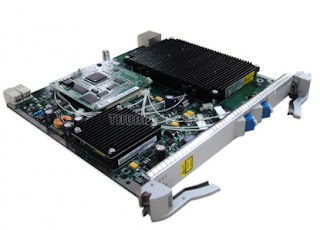
The slots valid for a board are determined by the following factors:
Slot bandwidth
Cross-connect capacity
Board version
Huawei SSN1BA2 card put slot :
200Gbit/s cross-connection capacity: slots 1–8 and 11–17 in the subrack.
120Gbit/s cross-connection capacity: slots 1–8 and 11–17
80Gbit/s cross-connection capacity: slots 1–8 and 11–17
40Gbit/s cross-connection capacity: slots 1–8 and 11–16
Huawei SSN1BPA and SSN2BPA card put slot :
200Gbit/s cross-connection capacity: slots 1–8 and 11–17
120Gbit/s cross-connection capacity: slots 1–8 and 11–17
What are the differences between 10GE LAN and 10GE WAN services?
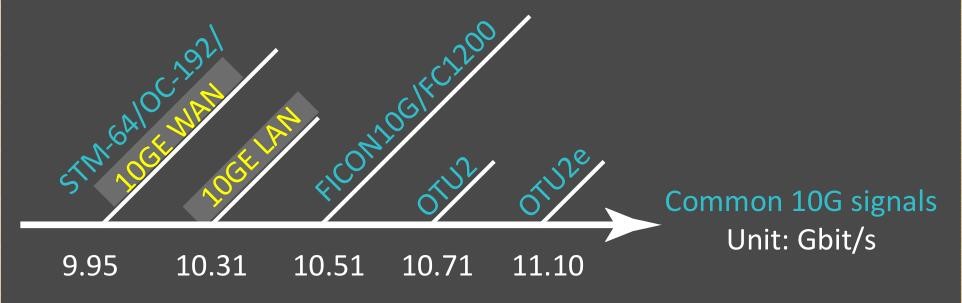
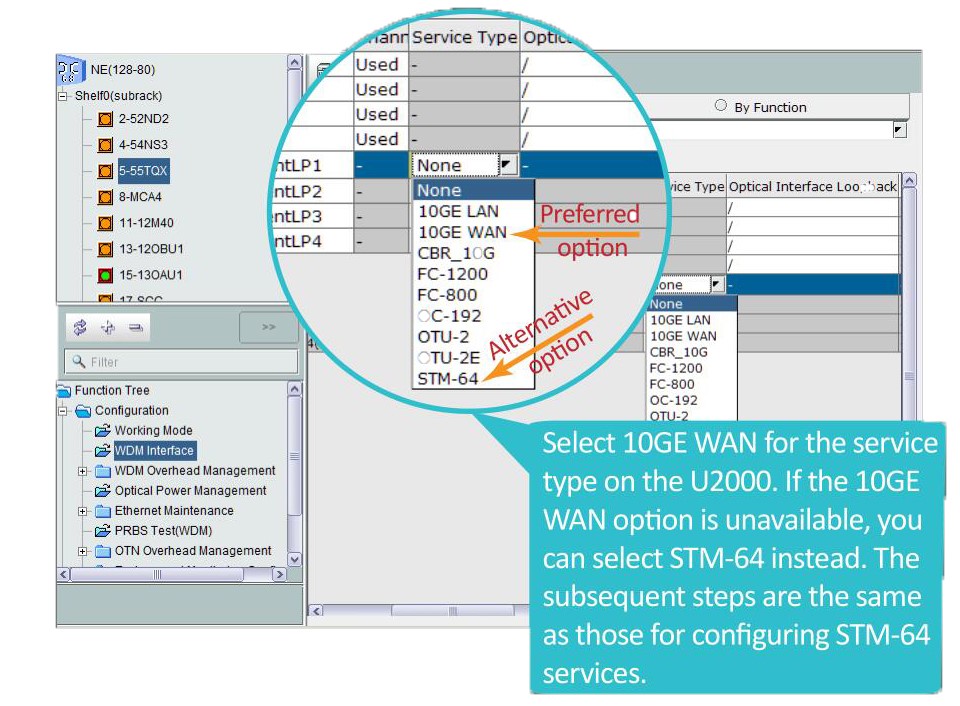
According to IEEE 802.3ae, compared with 10GE LAN services,10GE WAN services involve an additional process in which signals are encapsulated into standard SDH/SONET frames. In other words, 10GE WAN services are processed in a similar way as how Huawei STM-64 service board are processed in a Huawei WDM/OTN system.The most direct difference between 10GE LAN and 10GE WAN services is that they have different signal rates.
How do we configure 10GE LAN and 10GE WAN services?
Let's take a look at the steps for configuring 10GE WAN services.
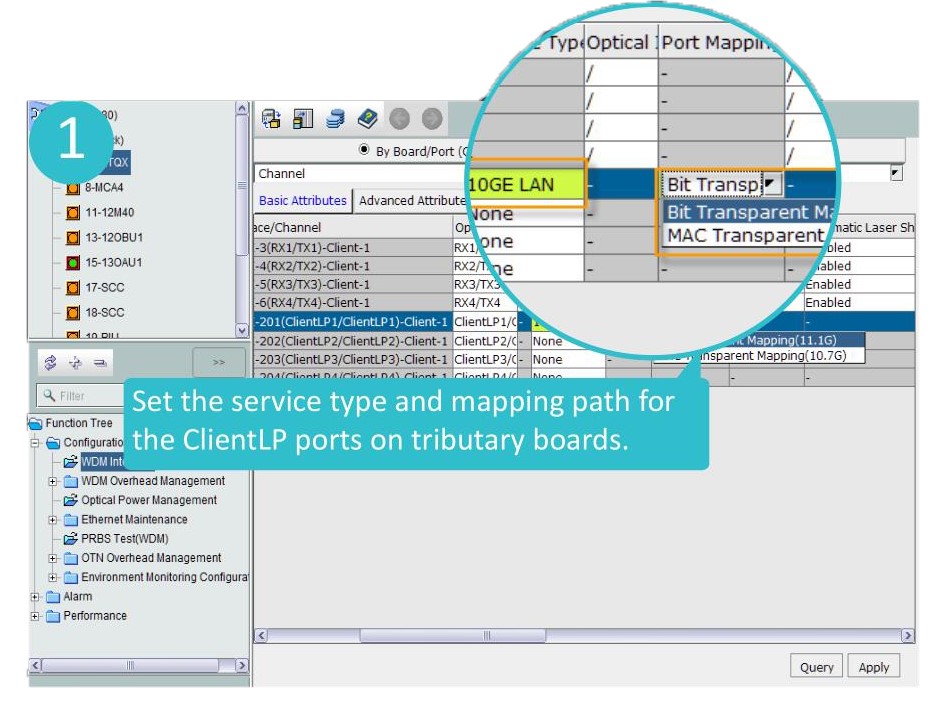
About the 10G LAN there are 2 types of port mapping ((bit transparent mapping and MAC transparent mapping))
What is the difference between bit transparent mapping and MAC transparent mapping?
In bit transparent mapping (11.1G) mode, the OTU frame frequency is increased to ensure the encoding gain and error correction capability of the FEC function.Therefore, the service rate is OTU2e,which is higher than OTU2. This mapping mode is recommended for interconnection between Huawei devices.
In MAC transparent mapping (10.7G) mode, the GFP-F encapsulation mode is used to map 10GE MAC frames into OTU2 signals.
This mapping mode provides a standard service rate and therefore facilitates interconnection between Huawei devices and peer devices.